Find Blooket answers without mixing lookup and scheduling
Blooket Answer Solver turns a live game PIN, homework ID, or play URL into one clean answer list. Search questions, check highlighted answers, and see which items still need review.
A live PIN opens the current game and can use the displayed temporary name for an isolated browser join. A homework ID or URL resolves the assigned question set without using that name.
Answer Solver handles lookup and review. The Ultimate XP & Coins Scheduler connects a Blooket account for Study mode, while the separate Pro Flooder creates a configured live-lobby roster.
Blooket: browser tools and dashboard setup
Dashboard tools
Answers, autosolve and game helpers
Use answer assistance and mode-specific tools on supported Blooket activities.
- AI answers and highlighting
- Autosolve, delay and accuracy settings
- Supported game-mode helpers
Your input, setup and result
Free or above · 5 task credits per action. Compare current allowances and plans.
- What you need
- A live lobby PIN, homework ID or Blooket URL. A Study-mode set ID belongs in XP + Coins Scheduler instead.
- What to do
- For a live lobby, choose Get Answers before the host starts. Check the temporary join name and source before running the lookup.
- What to check
- Review the returned question list and marked answers. Check the question text against the current set; an empty or partial list is not complete coverage.
- If it does not work
- If the lobby already started or closed, use a supported homework source when available. Recheck the PIN or URL and read the returned source notice before retrying.
The extension assists supported questions on the current Blooket page. Dashboard answer lookup, roster controls and Study-mode scheduling are separate tools.
Controls and result walkthrough
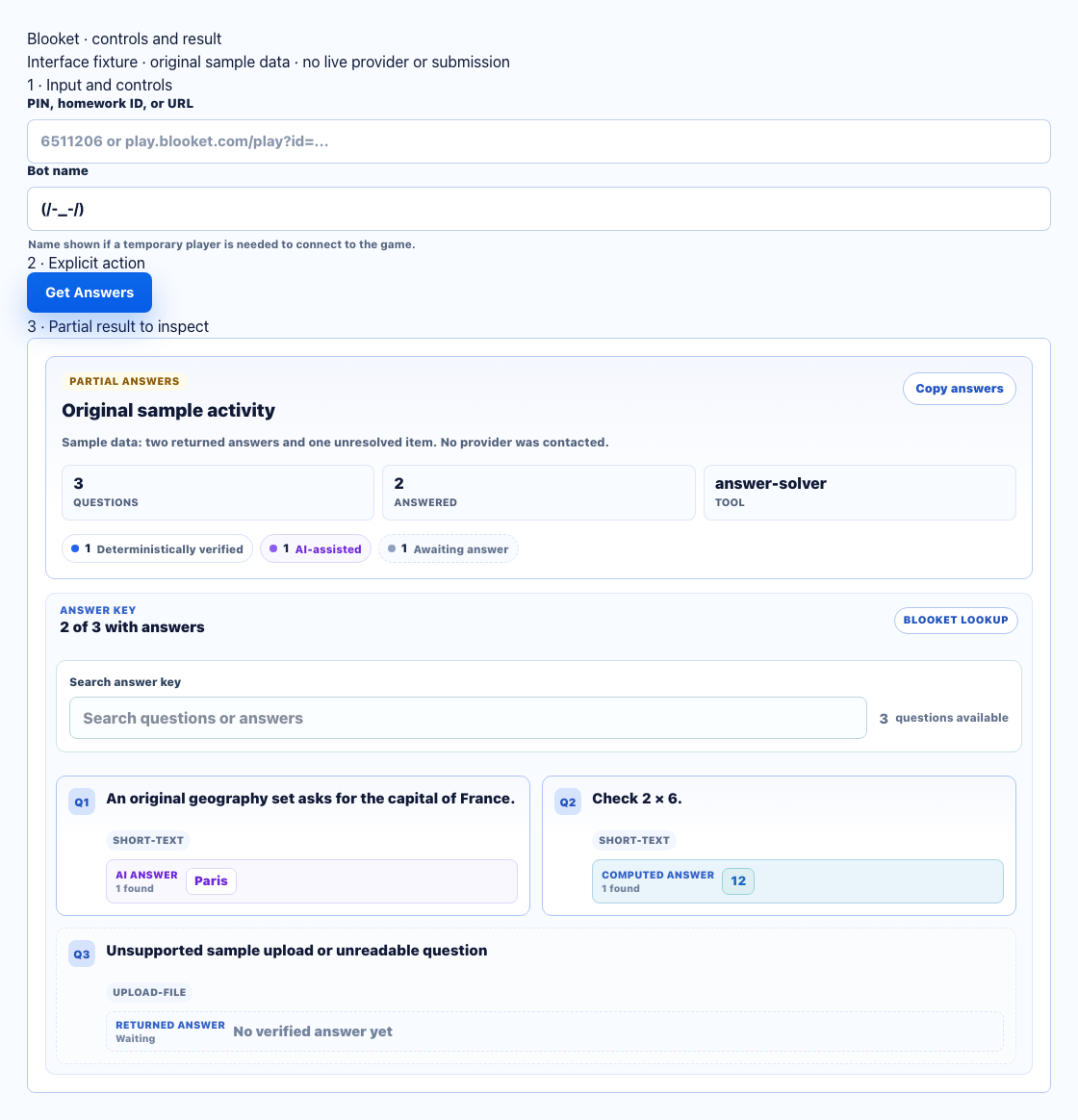
- Enter a PIN, homework ID or supported URL. This example is sample data.
- Use Get Answers for lookup; Flooder and the linked-account Study-mode scheduler are different tools.
- Compare answered and unanswered cards with the original set. Missing answers remain unresolved.
A clear workflow from source to result
- 1Enter the source
Paste a live PIN, homework ID, or full play URL.
- 2Set lookup controls
Choose an optional live-game helper name when you entered a PIN.
- 3Open the answer list
Let StudyOutlaws resolve the game or homework set.
- 4Review the result
Search questions and check verified and unresolved coverage.
Review answers with visible source and coverage states
Load live games and homework into the same searchable result experience.
Live and homework lookup
Use the host PIN for a live session or a homework ID or URL for assigned work.
Focused question search
Search by keyword and apply a question filter after the source loads.
Homework cache reuse
Recognized homework or set sources can reuse prior solver results automatically; live-PIN lookups are resolved live.
Live-game helper
Use the temporary name shown in the form only when a live PIN needs an isolated browser join.
Schedule XP and Coins runs separately
Save one Blooket set and control when Study mode runs.
Linked Study mode account
Connect the Blooket login used for scheduled Study mode runs.
Flexible run timing
Run immediately, once per day, or on selected weekdays with individual times.
Visible schedule controls
Review the active set and schedule, reconnect the account, or remove the saved configuration.
Use a PIN, homework ID, or Blooket URL
Start from the source you have and confirm the result state before relying on it.
Live game PIN
The PIN shown by a host for the current game.
Homework ID
The ID for an assigned homework question set.
Full play URL
A complete Blooket play link when that is easiest to copy.
Flooder lobby
A separate lobby code can start a Pro Flooder roster with 1 to 50 generated entries.
Separate tools with clear behavior
Answer Solver, XP and Coins Scheduler, and Flooder stay separate. Each tool shows its source, account requirement, result state, and live-session controls before it runs.
- Solver, scheduler, and Flooder stay separate
- AI-assisted answers and cacheable homework hits are identified
- Unresolved questions stay visible
- Live roster size stays explicit
Comparing several platforms or tool types? Use the school hacks and answer tools field guide.
Choose the right Blooket tool
Use Answer Solver to review live-game or homework answers. Use the scheduler to run Study mode for one saved set.
Answer Solver
- Live PIN or homework source
- No linked account required
- Searchable, labeled results
XP & Coins Scheduler
- One linked Blooket account
- One saved set ID
- Run now, daily, or weekly
Blooket FAQ
What is a Blooket answer solver?
It uses a live game PIN, homework ID, or Blooket play URL to open the available answer list. Provider answers, AI-assisted fallback answers, and still-unresolved questions remain distinguishable.
Can I use both live games and homework?
Yes. Enter the live PIN for a game, or paste a homework ID or full play URL for assigned work.
How much does a Blooket lookup cost?
A fresh successful Answer Solver lookup currently uses 5 task credits. Cache hits and results with no answers are not charged, and the dashboard shows the list price before the request starts.
Do I need to connect a Blooket account?
No account connection is required for Answer Solver. The separate XP & Coins Scheduler does require a linked Blooket account.
What are cached Blooket answers?
Cached answers are a prior answer set automatically reused for a recognized homework or set source. The current lookup response identifies an immediate cache hit; live-PIN lookups are not cached as full solver results.
What does the XP & Coins Scheduler do?
It is an Ultimate tool that runs Study mode for one saved set immediately, daily, or on selected weekdays. Each weekday can use its own time.
What does the Blooket Flooder do?
The Blooket Flooder is a separate Pro live-roster tool. Enter a lobby code and choose 1 to 50 generated entries; they join the lobby and stay until the game ends.