

Choose exact IXL assessments, teacher work, or recommendations
IXL Work Solver connects a native student account and loads available assessments, teacher tasks, and personalized recommendations into one selectable queue.
Show Answers provides a supported preview without changing the student score. Solve & Submit works through the selected queue with a chosen question count, accuracy range, and answer delay.
Run the exact work now or save supported timing. The connected account, selected items, question target, pacing, and current queue remain visible in the dashboard.
IXL: browser tools and dashboard setup
Dashboard tools
Answer tools for skills practice
Get help with supported practice questions and choose whether to automate responses.
- Question scanning and answer lookup
- AI fallback when available
- Optional autosolve
Your input, setup and result
Ultimate or above · No task credits for this action. Compare current allowances and plans.
- What you need
- A native IXL username and password and the exact work or skill. School Google, Clever or other SSO-only logins are not supported by dashboard account linking.
- What to do
- Load the account's work and preview one supported result. Review the target, accuracy and pacing before starting or scheduling a run.
- What to check
- Read the preview and current progress. Coverage depends on the skill and question type; a started run or saved schedule does not guarantee a completed score.
- If it does not work
- Reconnect an expired account session and refresh the work list. Check that the selected account has access to the skill. An unavailable skill needs a supported alternative.
The extension assists supported practice in the open IXL tab. Dashboard work selection and scheduling use a separately linked account.
Controls and result walkthrough
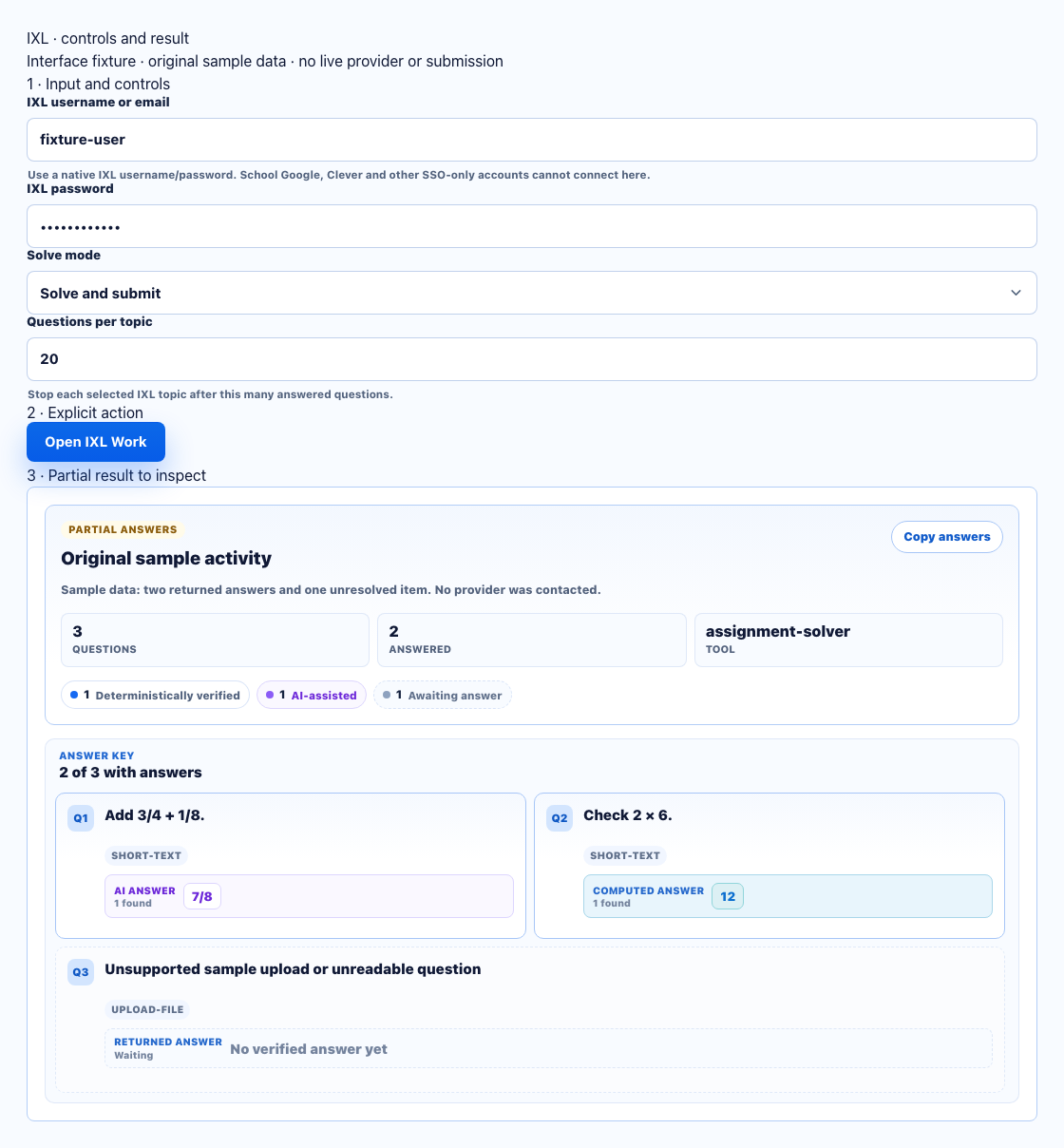
- Use a native IXL username/password; school SSO-only accounts cannot connect here.
- Defaults are Solve and submit and 20 questions per topic. Review mode, accuracy and delay before running.
- Inspect answered/skipped counts and the stop reason. The question limit is not a completed skill.
A clear workflow from source to result
- 1Connect IXL
Save and verify the native IXL student login.
- 2Select work
Choose assessments, teacher tasks, or recommendations.
- 3Configure the run
Set preview or run mode, question count, accuracy, and pacing.
- 4Run or schedule
Start now or save supported future timing.
Select assessments, teacher tasks, and recommendations
Build the queue from the work actually available to the connected student account.
Full assessments
Load complete assessments visible to the connected IXL student account.
Teacher-selected work
Choose one teacher task or build a queue from multiple assigned items.
Recommendations
Select personalized IXL recommendations instead of unrelated practice.
Exact work queue
Keep each selected work item in a visible run order before starting.
Preview or run supported IXL work
Keep preview, completion, question targets, accuracy, and pacing distinct.
Show Answers
Preview the supported current question without changing the student score.
Questions per topic
Set how many questions should be answered for each selected topic.
Accuracy control
Choose an intended accuracy range for the selected work run.
Pacing control
Set a minimum and maximum time between supported answers.
Run IXL work now or on a schedule
Reuse the exact selected work with understandable settings.
Run now
Start the selected work queue immediately with its current settings.
Schedule selected work
Save the selected queue for supported future timing.
Visible schedule details
Review the account, work list, question target, accuracy, and pacing before saving.
Exact selection with visible coverage
The IXL workflow keeps account, selection, coverage, and run settings visible instead of claiming support for every possible question format.
- Exact work stays selected
- Preview does not change the score
- Question and pacing controls stay visible
- Unsupported items remain reviewable
Comparing several platforms or tool types? Use the school hacks and answer tools field guide.
IXL answer preview vs. selected-work runner
Use Show Answers for a supported preview. Use Solve & Submit when you want the selected IXL queue to run with explicit question, accuracy, and pacing controls.
Show Answers
- Current selected work
- Read-only answer preview
- No score change
Solve & Submit
- Selected IXL work queue
- Accuracy and pacing controls
- Now or scheduled
IXL FAQ
What is the IXL Work Solver?
It connects a native IXL student account, loads unfinished assessments, teacher-assigned work, and personalized recommendations, then lets you preview or run the exact items you select.
Which IXL work can I choose?
It can load full assessments, teacher-selected tasks, and personalized IXL recommendations that are available to the connected student account.
How do Show Answers and Solve & Submit differ?
Show Answers previews supported current questions without changing the student score. Solve & Submit runs the selected work with the configured question count, accuracy, and pacing.
Can IXL work be scheduled?
Yes. Choose the exact IXL work, question count, accuracy, pacing, and timing before saving a supported schedule.
Does the IXL solver use task credits?
IXL is an Ultimate feature and currently does not consume StudyOutlaws task credits.
How does IXL Work Solver keep the selected work clear?
It keeps the connected IXL account, selected work queue, question target, accuracy, pacing, and current coverage visible before the run begins.