

Choose Google Classroom coursework with permission-aware actions
Google Classroom Coursework Solver connects through Google OAuth and loads coursework available to the selected student account. Choose one item or the unfinished queue without sharing a Google password.
Show Answers provides a reviewable result for supported questions. Solve & Submit can create a plain-text Drive answer sheet for eligible assignments. Creation, attachment and turn-in are separate outcomes; teacher-created work normally needs manual turn-in.
The selected coursework can run now or on a saved schedule with the account, mode, accuracy, and pacing kept visible before the run starts.
Google Classroom: browser tools and dashboard setup
Dashboard tools
Your coursework dashboard, one click away
Open the StudyOutlaws Google Classroom workflow from the extension's platform directory.
- Dashboard launcher
- Coursework tools run on the website
- No in-page extension solver in this beta
Your input, setup and result
Pro or above · 2 task credits per action. Compare current allowances and plans.
- What you need
- An authorized Google account and readable native question text, text-only assignment with no materials, or an owner/editor-readable Form.
- What to do
- Connect Google, select coursework and create answers. Inspect answer-sheet creation, attachment and turn-in as separate outcomes.
- What to check
- Drive answer-sheet creation, attachment and turn-in require developer-associated coursework. Teacher-created work supports answer review only here; create or attach any required response and turn it in manually in Classroom.
- If it does not work
- Reconnect Google with the required scopes. For admin-blocked OAuth, contact the school administrator. Open unreadable attachments or responder-only Forms manually.
The extension launches the dashboard workflow; it does not answer or turn in arbitrary Classroom pages in the tab.
Controls and result walkthrough
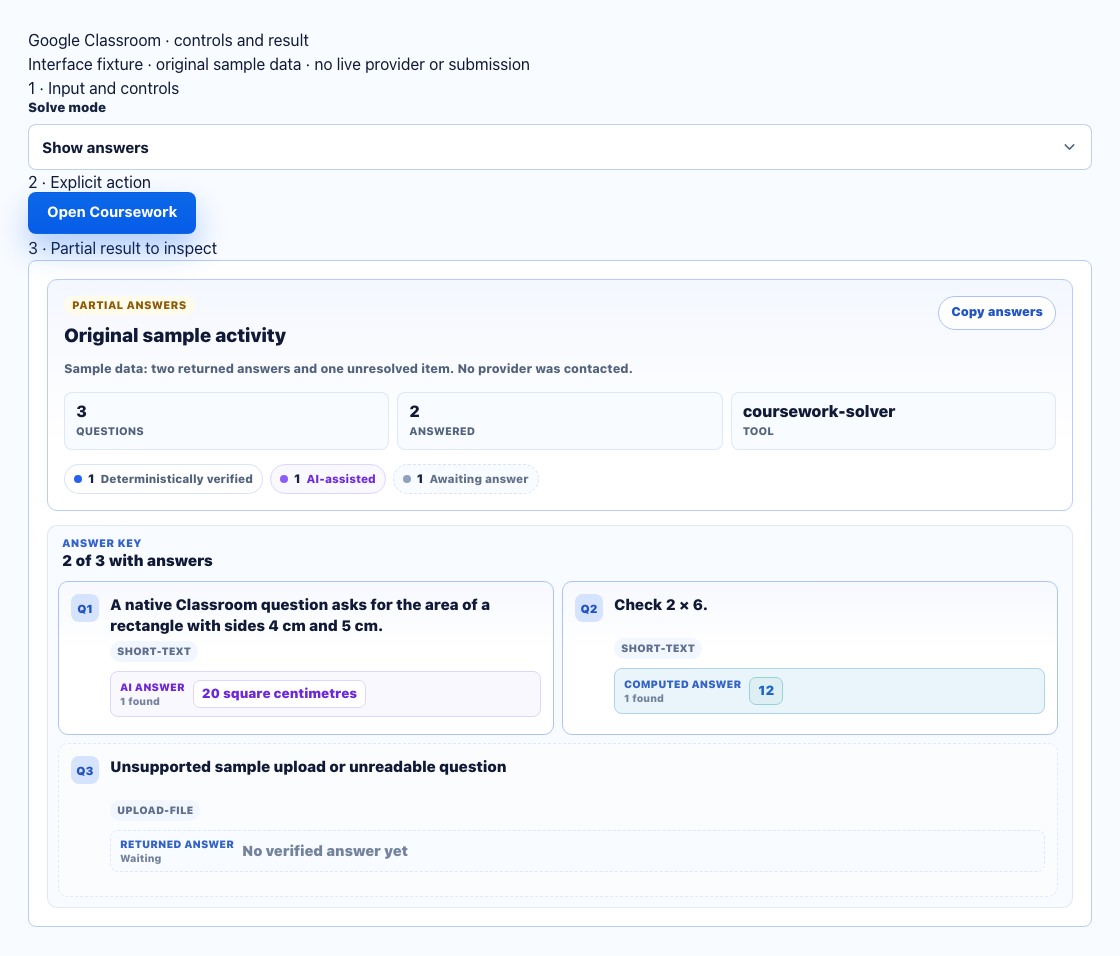
- Connect Google and select coursework in the full dashboard.
- Show answers creates a review result. Drive attachment and turn-in are later, separate outcomes.
- Inspect missing items and each write stage. Teacher-created work supports answer review only; response creation, attachment and turn-in must be done manually.
A clear workflow from source to result
- 1Connect Google
Authorize the student Google account through Google's OAuth screen.
- 2Select coursework
Choose one coursework item or the unfinished queue.
- 3Set the mode
Choose Show Answers or an eligible answer-sheet run and review its settings.
- 4Run or schedule
Start now or save supported future timing.
Review or run the coursework you explicitly select
Keep the connected Google account, exact coursework, mode, and source coverage together.
Google OAuth connection
Connect with Google OAuth and approve the narrow coursework permissions shown by Google.
Coursework picker
Choose one available coursework item or build a queue from unfinished work.
Show Answers
Review supported answers without creating an attachment or submitting the work.
Eligible answer sheets
Create an answer-sheet attachment only for eligible assignments and supported question data.
Use coursework and readable Forms without broad access claims
Answer coverage follows the data Google makes available to the connected account.
Coursework questions
Read native Classroom questions, text-only assignments without materials, and Forms available to an owner/editor. PDF, image, Docs, Slides and video attachments are not general solving inputs.
Readable Google Forms
Read Google Forms question data only when the connected account has the required access.
Visible coverage
Keep unavailable or unsupported question data visible instead of inventing a result.
Schedule supported Google Classroom work
Reuse a clear coursework selection now or later.
Run now
Start the selected coursework immediately with the current mode and pacing.
Scheduled coursework
Save eligible selected work for a future time with the connected account named.
Visible run settings
Review the mode, accuracy, pacing, and selected queue before the schedule is saved.
Permission-aware coursework controls
The Google Classroom workflow uses account-scoped permissions and exposes the exact action available for each selected assignment.
- Google OAuth instead of password collection
- Exact coursework stays visible
- Unsupported actions remain unavailable
- Disconnect removes the saved connection
Comparing several platforms or tool types? Use the school hacks and answer tools field guide.
Google Classroom Show Answers vs. coursework runs
Use Show Answers for a reviewable result. Use Solve & Submit only when the selected coursework supports the answer-sheet workflow.
Show Answers
- Read available coursework
- Review supported answers
- No automatic turn-in
Solve & Submit
- Eligible assignment files
- Generated answer-sheet attachment
- Now or scheduled
Google Classroom FAQ
What is the Google Classroom Coursework Solver?
It connects through Google OAuth, loads coursework visible to that Google account, and lets you choose one item or the unfinished queue for a supported answer workflow.
Does StudyOutlaws collect my Google password?
No. StudyOutlaws uses Google's authorization flow and never asks for or stores your Google password or browser cookies.
How many credits does Google Classroom use?
The Coursework Solver uses 2 task credits for each selected coursework item. The dashboard shows the per-task price before the run starts.
Which Google Classroom assignments can it read?
Native question text and text-only assignments without materials are supported. Forms require owner/editor API access. PDFs, images, Docs, Slides and video attachments are not general file-solving inputs.
Can it submit every Google Classroom assignment?
Show Answers opens the supported result without submitting. Solve & Submit can create and attach an answer sheet for eligible assignments; Google restricts direct API turn-in to developer-associated coursework.
Can Google Classroom coursework be scheduled?
Yes. Choose the supported coursework, timing, accuracy, and pacing, then save a run for the connected Google account.
What does the Coursework Solver show before a run?
It keeps the connected Google account, selected coursework, mode, supported action, cost, accuracy, and pacing visible before the run begins.