

Turn a game code or public link into an organized answer list
Wayground Answer Solver turns a 6–8-character game code or public activity link into one clean answer list. Add an optional question filter before the lookup, then review or copy the returned answers.
No saved Wayground account is required. The solver uses only the source entered for that lookup, and the current response identifies an immediate cache hit when one occurs.
Quizizz is now named Wayground, so people still search for Quizizz answers, solvers, or hacks when they mean the same platform. StudyOutlaws supports the current Wayground sources while keeping both names clear.
Wayground / Quizizz: browser tools and dashboard setup
Dashboard tools
Quiz answers, right on the page
Answer tools for supported Wayground activities, formerly Quizizz.
- Verified lookup and AI fallback
- Answer highlighting
- Optional autosolve
Your input, setup and result
Free or above · 10 task credits per action. Compare current allowances and plans.
- What you need
- A 6–8-character live game code or a supported public Wayground activity URL. Older Quizizz names refer to the same platform family.
- What to do
- Enter the code or public quiz URL and optionally set Question filter before Get Answers. It narrows fetched questions, not source discovery. Review the returned cards; there is no separate result-search control.
- What to check
- Review the answer list and the result notice. Waiting for a session, partial coverage, no questions and a failed lookup are different outcomes.
- If it does not work
- Check the code or public URL and clear restrictive filters. If the session ended, use the public activity URL when available instead of repeatedly sending the old code.
The extension assists a supported open Wayground or Quizizz activity. Dashboard lookup resolves the supplied code or public link separately.
Controls and result walkthrough
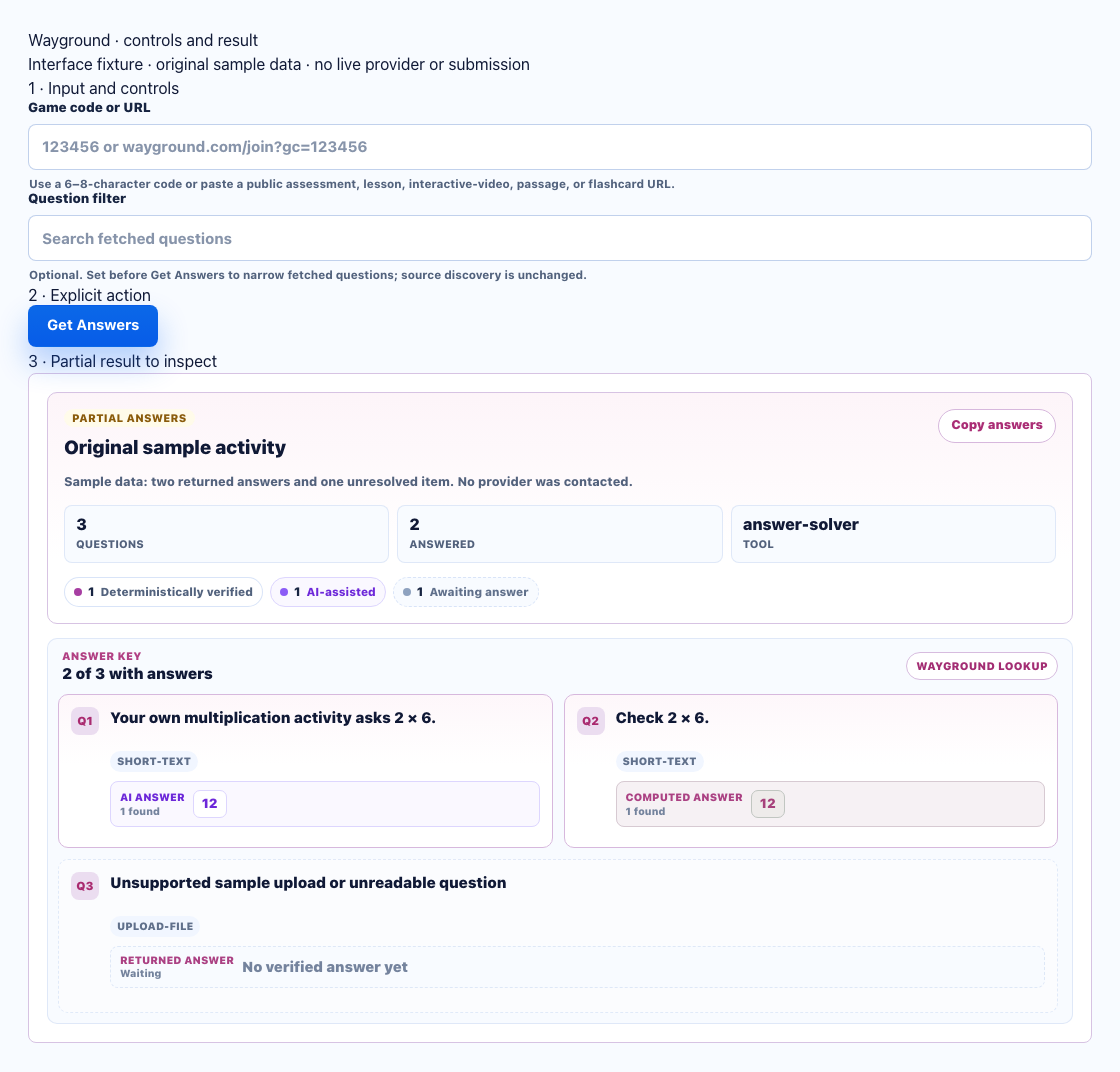
- Use an active code or supported public activity URL.
- Set Question filter before Get Answers. Review the returned cards; there is no separate result-search control.
- Review the resolved source and unresolved cards. Ended or unreadable rooms can return no usable data.
A clear workflow from source to result
- 1Add the source
Enter a 6–8-character game code or public activity link.
- 2Set preferences
Optionally add a question filter or keep result notices visible.
- 3Get answers
Validate the source and load normalized questions and answers.
- 4Review the list
Review the returned list and copy the displayed answers when useful.
Load and review Wayground answers in one focused view
Use the source you have without connecting a saved Wayground account.
6–8-character code lookup
Enter the code shown for an active Wayground game or activity.
Public-link lookup
Paste a public activity or quiz URL when you have the full link.
Question filter
Enter a word or phrase before the lookup to narrow the returned question list.
Review or copy
Review the returned list in the dashboard or copy all displayed answers.
Filter, review, and copy Wayground results
Keep the answer list easy to scan even when an activity is long.
Filtered result
The optional pre-run filter limits the returned list to matching question text.
Copy answers
Copy Answers copies the answer list currently shown in the result panel.
Anonymous notice
Keep the read-only anonymous-lookup notice visible when that context is useful.
Understand fresh, cached, and anonymous states
Confirm where the result came from before relying on it.
Fresh result
The answer set was loaded for the current lookup.
Cached result
A prior set was recognized and reused for this lookup; the immediate response identifies that cache hit.
Anonymous lookup
The lookup remains read-only and does not use a saved Wayground account.
Source-dependent coverage
Unavailable data remains missing instead of being presented as verified.
Answer lookup without bypass claims
The solver provides read-only lookup from the source you supply. It does not promise undetectability, guaranteed coverage, or detection avoidance.
- No anti-cheat bypass claims
- No flood-bot or crash controls
- Immediate cache hits are identified
- Use only where you have permission
Comparing several platforms or tool types? Use the school hacks and answer tools field guide.
Wayground (formerly Quizizz) code vs. public link
Both sources open the same filterable answer view. The only difference is how the activity is identified.
Game code
- 6–8 letters or numbers
- Useful for an active activity
- Opens the standard result view
Public link
- Public activity or quiz URL
- Identifies the activity directly
- No saved account needed
Wayground / Quizizz FAQ
What is a Wayground answer solver?
It uses a 6–8-character game code or public Wayground activity link to load available questions and correct answers in one focused list.
Can I use either a game code or link?
Yes. Enter the 6–8-character code shown for the activity or paste a public Wayground activity or quiz URL.
Do I need a connected Wayground account?
No. Answer Solver uses only the game code or public activity link entered for that lookup.
How much does a lookup cost?
A fresh successful lookup currently uses 10 task credits. Cache hits and results with no answers are not charged, and the dashboard shows the list price before the request starts.
What does a cache-hit notice mean?
It means StudyOutlaws reused a prior answer set for the same source. The current lookup response identifies an immediate cache hit.
Is Wayground the same as Quizizz?
Yes. Quizizz changed its product name to Wayground, while existing accounts, resources, and older Quizizz links continue to work. That is why this guide uses both names.