
 Khan Academy guide
How to get Khan Academy exercise answers
Open a Khan Academy exercise with the StudyOutlaws Chrome extension installed and signed in. When a question appears, it gets the exercise's published answers and outlines the correct choice with a Correct badge. For a typed question, the answer shows beside the box. Nothing is typed or submitted, so you enter the answer yourself.
One lookup covers every question in the exercise and costs 0.5 task credits. A choice question the published answers miss goes to AI for 0.5 credits. Failed or empty lookups cost nothing.
Highlighting works on every plan. There's no Autosolve on Khan Academy, and graphs, number lines and drag-and-drop questions aren't covered.
How to use it
- Install the extension
Use the Chrome Web Store link on the Extension page.
- Sign in
Sign in with your StudyOutlaws account; Free is enough.
- Open an exercise
Open an exercise page; reload it if it was already open.
- Answer
Follow the highlight or hint, then press Check yourself.
What you will see
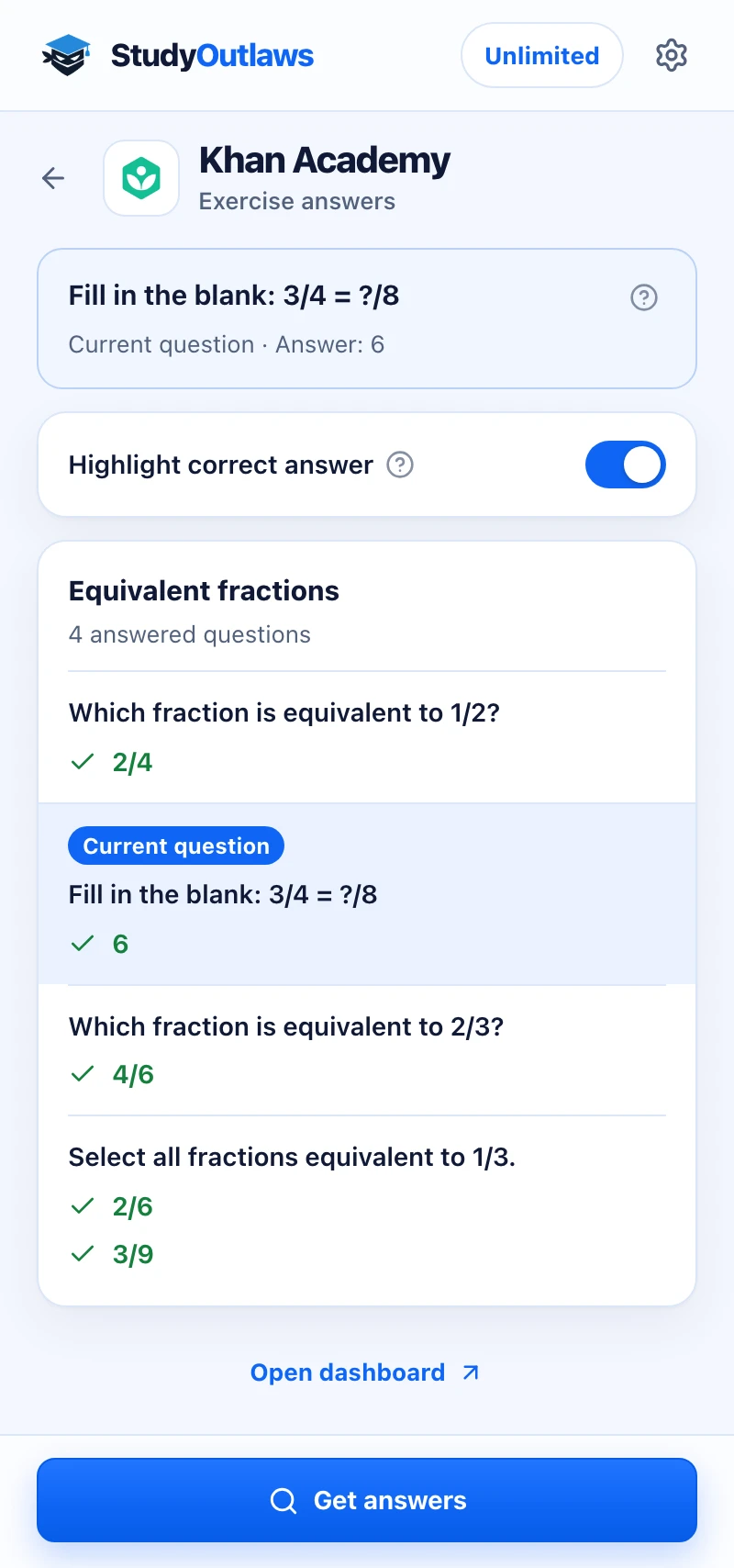
Press Get answers on the exercise. Its published answers load for every question at once.
The question on your screen is marked as Current question, with its answer at the top of the panel.
Highlight correct answer marks the right choice on the page. For typed questions, the answer appears beside the box for you to enter.
What the extension shows on a Khan Academy exercise
With Highlight correct answer on, the first question of an exercise starts the lookup.
- Choice questions
- Outlines the correct choice with a Correct badge.
- Typed answers
- Shows the answer next to each number or dropdown.
- Get answers
- Lists every answer in the exercise and marks the current one.
- AI answers
- Answers choice questions the published set misses.
Set up the Khan Academy Chrome extension
Khan Academy exercise answers
Outlines the correct choice on a Khan Academy exercise and shows typed answers beside the box, without typing or submitting.
- Highlight correct answer
- Typed answer hints
- Get answers for the whole exercise
Limits of the Khan Academy tools
It shows the answers an exercise stores, one exercise at a time.
- It shows answers only; it never types, checks or submits.
- Graph, number line, sorter, matcher, categorizer and label-image questions aren't covered.
- Typed questions get no AI answer, and picture-only choices stay unmarked.
- It works on exercise pages only, and there's no dashboard tool for Khan Academy.
Comparing several platforms? Read the school hacks guide
Which Khan Academy questions get an answer?
The extension shows answers that Khan Academy stores with the exercise. Questions you answer by dragging or plotting have no single stored answer.
Questions with a stored answer
- Multiple-choice questions
- Number and expression answers
- Dropdown answers
Interactive questions
- Graphs and number lines
- Sorting, matching and categorizing
- Labeling a picture
Khan Academy FAQ
How do I get Khan Academy answers?
Install the StudyOutlaws Chrome extension, sign in and open a Khan Academy exercise. When a question appears, the correct choice gets an outline and a Correct badge, or the answer shows beside the answer box.
Is there a Khan Academy hack or cheat that works?
StudyOutlaws doesn't edit your progress, and there's no Autosolve on Khan Academy. The Chrome extension shows the answers an exercise stores: it outlines the right choice or shows the answer beside the box, and you enter it and press Check yourself. Graphs and drag-and-drop questions aren't covered. Follow your school's rules.
Can it answer Khan Academy questions for me?
No. There's no Autosolve on Khan Academy. The extension shows the answer, and you enter it and press Check yourself.
Does it work on Khan Academy unit tests and quizzes?
Only on exercise pages, whose web address contains /e/ and the exercise name. If a quiz, unit test or mastery challenge opens at a different address, the extension shows Open a Khan Academy exercise first.
Does it work on graphing questions?
No. Graph, number line, sorter, matcher, categorizer and label-image questions aren't covered. The extension counts them as unsupported.
Does it show answers for typed questions?
Yes for numbers, expressions and dropdowns. The answer appears beside each box, for example Answer 200, and nothing is typed for you.
Is the Khan Academy extension free?
Highlighting works on the Free plan. Each exercise lookup uses 0.5 task credits, so the 15 weekly Free credits cover up to 30 exercises. Choice questions answered by AI cost 0.5 credits each.
Does it work on Khan Academy in other languages?
It runs on www.khanacademy.org and en.khanacademy.org and looks up the English version of the exercise. Other language sites aren't covered.
Set up Khan Academy in Chrome.
Install the extension, sign in and open an exercise to see its answers.
Other platform guides





StudyOutlaws is not affiliated with or endorsed by Khan Academy. The extension is in beta, and which questions it can answer varies by exercise.