
 Gimkit guide
How to get Gimkit answers in a live game
Install the StudyOutlaws Chrome extension, sign in and then join your Gimkit game. When a question opens, the extension gets the game's answers and outlines the correct choice with a Correct badge. Press Get answers in the extension to see the full answer list, with the current question marked.
One lookup returns the answers for the whole game and costs 0.5 task credits. A question the game data doesn't cover goes to AI for 0.5 credits. Failed or empty lookups cost nothing.
Highlighting works on every plan. Autosolve, which picks the answer after your delay and presses Continue, needs Pro or Ultimate. Both work on multiple-choice questions only.
How to use it
- Install the extension
Use the Chrome Web Store link on the Extension page.
- Sign in
Sign in with your StudyOutlaws account; Free is enough.
- Join the game
Join with your game code once the extension is installed.
- Answer
Follow the highlight, or use Autosolve on Pro or Ultimate.
What you will see
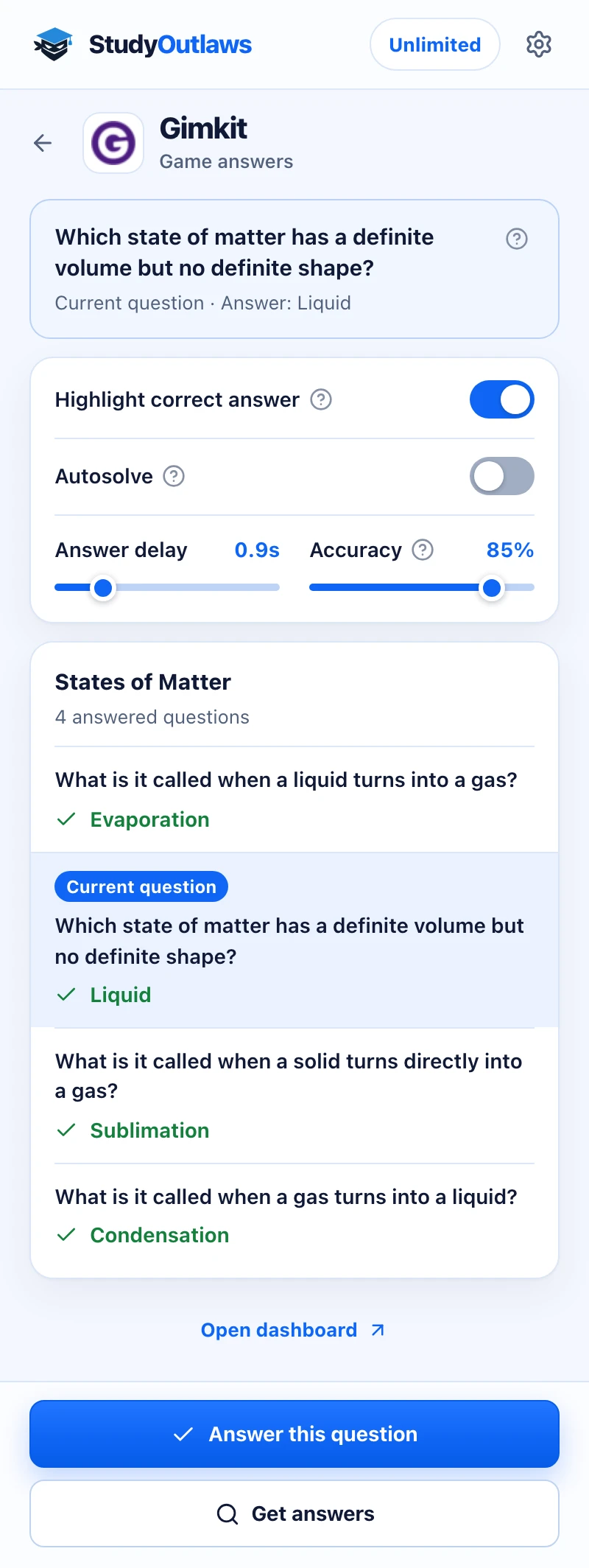
Press Get answers once you're in the game. The whole game's questions and answers load at once.
The current question is marked in the list, and its answer shows at the top. Highlight correct answer marks the right tile in the game.
Answer this question picks the answer for you on Pro, using your Answer delay and Accuracy. On other plans the button shows the answer instead.
What the extension does in a Gimkit game
With Highlight correct answer on, the first question of a game starts the lookup.
- Highlight correct answer
- Outlines the correct choice when a question opens.
- Get answers
- Lists every answer in the game and marks the current one.
- AI answers
- Answers questions the game data misses, marked AI answer.
Gimkit Autosolve settings
These settings need Pro or Ultimate.
- Autosolve
- Picks the answer, then presses Continue for you.
- Answer delay
- Waits 0 to 5 seconds first; the default is 0.9 seconds.
- Accuracy
- How often Autosolve is right; the default is 85%.
Set up the Gimkit Chrome extension
Gimkit answers in your live game
Outlines the correct choice in each Gimkit question, and Pro autosolve can answer and press Continue for you.
- Highlight correct answer
- Get answers for the whole game
- Pro autosolve with delay and accuracy
Limits of the Gimkit tools
It answers what the game data covers, one game at a time.
- Highlighting and Autosolve cover multiple-choice questions only, and choices that are only a picture are skipped.
- The extension must be running before you join; if it wasn't, reload the page and join again.
- If a question is missing from the answers, the extension looks once more, then asks AI.
- Autosolve never presses Close, and there's no dashboard tool for Gimkit.
Comparing several platforms? Read the school hacks guide
What you get on each plan
Both use the same answers and the same credits. Pro and Ultimate add the extension clicking the answer for you.
See the answer
- Highlight correct answer in the game
- Get answers lists the whole game
- Show answer reveals the current one
Let it answer
- Autosolve answers and presses Continue
- Answer this question selects the answer
- Answer delay and Accuracy settings
Gimkit FAQ
How do I get answers in a Gimkit game?
Install the StudyOutlaws Chrome extension and sign in, then join the game. When a question appears, the correct choice gets an outline and a Correct badge. Press Get answers in the extension to see every answer in the game.
Is there a Gimkit hack or cheat that works?
StudyOutlaws doesn't edit your cash or score, or change the game. The extension reads the question data Gimkit sends to your browser and shows you the right choice, and on Pro or Ultimate, Autosolve can click it for you. It covers multiple-choice questions only. Follow your school's rules and Gimkit's terms.
Is the Gimkit extension free?
Highlighting works on the Free plan. A game lookup uses 0.5 task credits, so the 15 weekly Free credits cover up to 30 games. Questions answered by AI cost 0.5 credits each.
Can it answer Gimkit questions automatically?
Yes, with Pro or Ultimate. Turn on Autosolve and it picks the answer after your Answer delay, then presses Continue. At the default 85% Accuracy it sometimes picks a wrong answer on purpose; set 100% to always answer correctly.
Why does it tell me to reload the page?
The extension has to be running before you join, because it reads the game data as it arrives. Reload the Gimkit page, join the game again and press Get answers.
Does it work on typed-answer questions?
Highlighting and Autosolve work on multiple-choice questions only. For a typed question, the answer shows in the extension's answer list, and you type it yourself.
Does it work on my phone?
No. It runs in Chrome on a computer, on gimkit.com. The Gimkit app on a phone or tablet isn't covered.
Set up Gimkit in Chrome.
Install the extension and sign in before you join the game.
Other platform guides
 Membean6 min read
 Kahoot8 min read
 Blooket7 min read
 Wayground / Quizizz6 min read
 DeltaMath6 min read
 Edpuzzle6 min read
 Pear Assessment6 min read
 Google Classroom6 min read
 IXL6 min read
 Edmentum4 min read
 Khan Academy4 min read
 Quizlet Live4 min read
 Google Forms4 min read
 NoRedInk4 min read
 AP Classroom4 min read
StudyOutlaws is not affiliated with or endorsed by Gimkit. The extension is in beta, and a change to Gimkit's game can stop lookups until we update it.