
 Google Forms guide
How to get answers on a Google Forms quiz
Open the quiz form, open the StudyOutlaws extension and press Show answers. It reads every question on the page and marks the answer on the form: the right option gets an outline, and text boxes and dropdowns get a hint with the answer.
On Pro or Ultimate the button says Fill in answers, and Autosolve can work down the form for you, one question at a time after your answer delay. Neither one presses Submit, Next or Clear form, so you always review and submit the form yourself.
Answers come from AI reading the question, not from the form's answer key, so check them. Each new answer costs 0.5 credits, and an answer already found on the page isn't charged again.
How to use it
- Install the extension
Use the Chrome Web Store link on the StudyOutlaws Extension page.
- Sign in
Use your StudyOutlaws account; a Free account is enough.
- Open the form
Reload the quiz so the extension can read its questions.
- Answer and submit
Press Show answers, or Fill in answers on Pro, then check every answer and submit.
What you will see
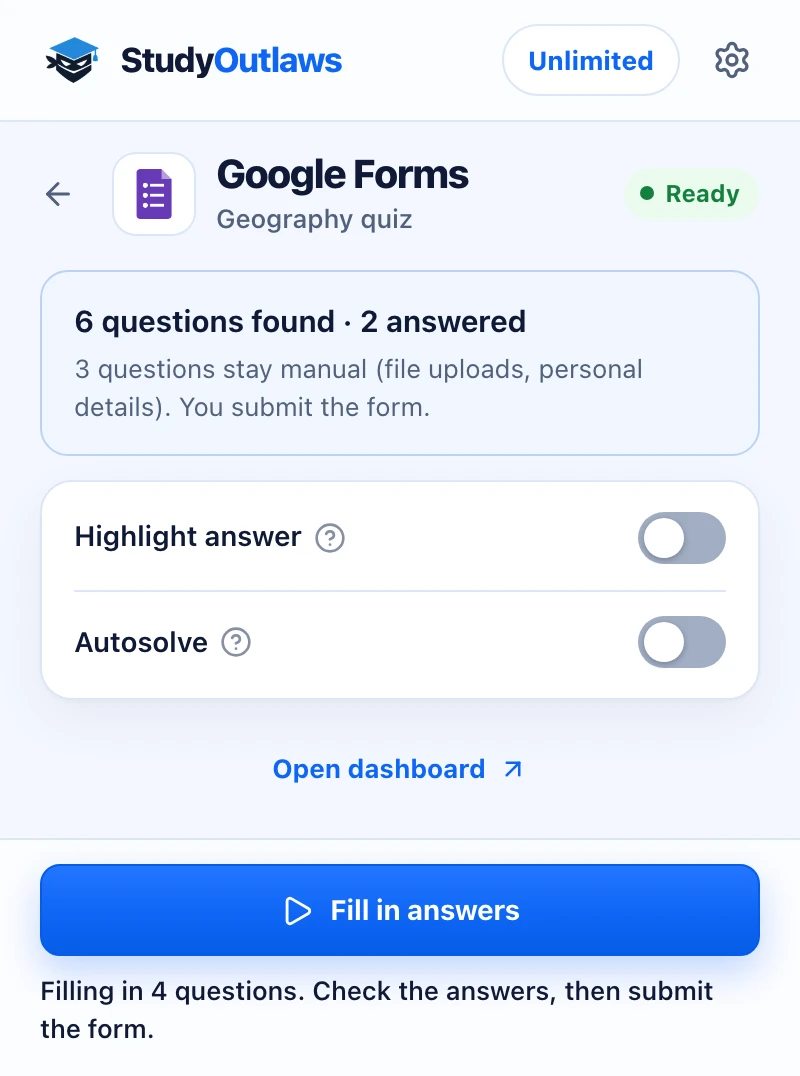
Open the form's respond page. The panel counts the questions it found and how many already have answers.
File uploads and personal details stay for you to fill in, and you always submit the form yourself.
Turn on Highlight answer to mark answers on the form. Fill in answers enters them on Pro, then you check and submit.
Which Google Forms questions it answers
The extension reads each question on the page you fill in and answers the types below.
- Choices and scales
- Outlines the right option for multiple choice, checkboxes and linear scales.
- Choice grids
- Picks the answer in each row of a multiple choice or checkbox grid.
- Dropdowns
- Shows the option to choose next to the dropdown, and Pro fills it in.
- Short answer and paragraph
- Shows the answer next to the box, and Pro types it in for you.
Turn on Highlight answer to look up questions as you scroll. It's off at first, because Forms also hosts surveys and sign-up forms.
Set up the Google Forms Chrome extension
Google Forms quiz answers
See the answer to every question on a Google Forms quiz, and fill the form in on Pro while you still press Submit.
- Marks the answer on each question
- Fills in answers on Pro
- Never submits the form
Limits of the Google Forms tools
It answers the questions you can see and leaves the form to you.
- It never presses Submit, Next or Clear form; you submit the form.
- File uploads, the Other text box and fields about you, such as name, email, class or student ID, stay manual.
- One run looks up at most 40 new questions on a page.
- It runs only on the page you fill in, never in the form editor or on results.
Comparing several platforms? Read the school hacks guide
See answers or have them filled in?
Every plan can see answers on the form. Filling them in for you, by button or Autosolve, needs Pro or Ultimate.
See the answers
- Show answers marks every question on the page
- Highlight answer looks up questions as you scroll
- You click and type the answers yourself
Fill in the answers
- Fill in answers enters them for you
- Autosolve works down the form after your delay
- You still check and submit the form
Google Forms FAQ
How do I see answers on a Google Forms quiz?
Install the StudyOutlaws Chrome extension, sign in and open the quiz form. Open the extension and press Show answers. It outlines the right option on each question and shows a hint next to text boxes.
Is there a Google Forms hack that shows the answers?
StudyOutlaws doesn't read the form's answer key or edit your score. The Chrome extension reads the questions on the page, works out each answer with AI and marks it on the form, and on Pro or Ultimate it can fill them in. It never submits, so check every answer first and follow your school's rules.
Does it read the form's answer key?
No. It reads the questions and options shown on the page and works out each answer with AI. Check the answers before you submit.
Does it submit the Google Form for me?
No. It never presses Submit, Next or Clear form. Even with Autosolve on, you review the answers and submit the form yourself.
Is the Google Forms extension free?
Yes, on every plan. Each new answer costs 0.5 credits, so the Free plan's 15 weekly credits cover about 30 answers. Pro has 100 credits a day and Ultimate is unlimited. Filling answers in needs Pro or Ultimate.
Which Google Forms questions does it answer?
Multiple choice, checkboxes, dropdowns, short answer, paragraph, linear scale and multiple choice or checkbox grids. File uploads and questions about you, such as your name, email or class, stay yours.
Does it work on forms with several sections?
Yes. Answer the section you see, then press Next yourself. The extension reads the questions of each new section as it opens.
Why doesn't the extension find my form's questions?
Reload the form after you install the extension or sign in. It only works on the page you fill in, not in the form editor or on results.
Set up Google Forms in Chrome.
Install the extension, sign in and reload the quiz form to see its answers.
Other platform guides





StudyOutlaws is not affiliated with or endorsed by Google. Answers are worked out by AI from the question text, so they can be wrong.