
 NoRedInk guide
How to get NoRedInk answers
Open a NoRedInk practice, quiz or diagnostic question with the StudyOutlaws extension open. It reads the question from the page and marks the answer: the right option is outlined, or a hint shows the words to fix. Press Show answer if Highlight answer is off.
On Pro or Ultimate, Autosolve enters the answer like you would, after your answer delay, and presses Submit answer. After a miss, it presses Try a similar problem. It also works through tutorials step by step.
When NoRedInk shows the correct answer after a miss, the extension sends it to StudyOutlaws for free, and confirmed answers are used before AI. Each answer costs 0.5 credits.
How to use it
- Install the extension
Use the Chrome Web Store link on the StudyOutlaws Extension page.
- Sign in
Use your StudyOutlaws account; a Free account is enough.
- Open a question
Start practice, a quiz or a diagnostic, then reload it if it was already open.
- Answer it
Read the marked answer, or turn on Autosolve on Pro to answer and submit.
What you will see
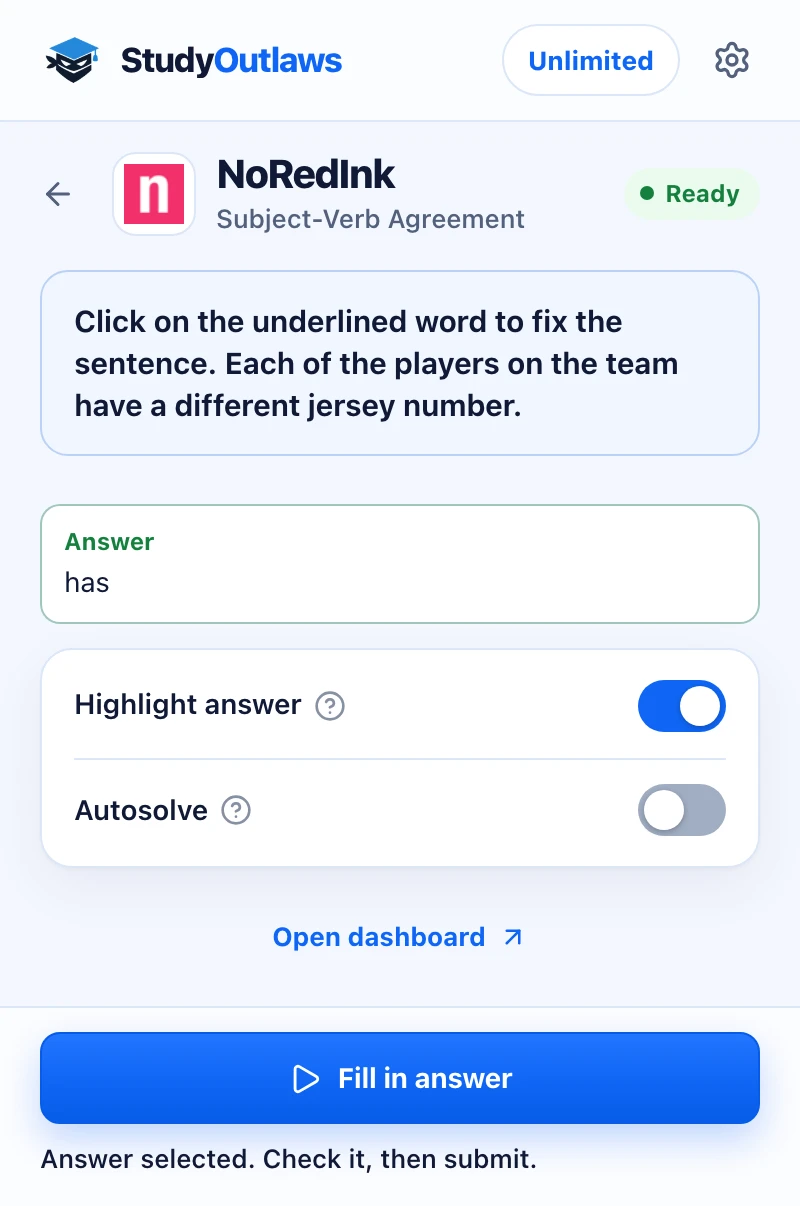
Open a NoRedInk quiz question. The panel shows the question and its answer, here the corrected word has.
Highlight answer marks it on the page. Fill in answer selects it for you on Pro.
Check the answer, then submit. Writing assignments such as Quick Writes stay for you to write.
Which NoRedInk questions it answers
These NoRedInk question types work in practice, quizzes and diagnostics. Anything else shows as not supported yet.
- Multiple choice and word choice
- Outlines the right option, or the right word in each word choice.
- Highlighting and sentence tags
- Marks the words or phrases to highlight, and the tag for each sentence.
- Punctuation and formatting
- Places punctuation, fixes capitals and formats titles with italics or quotation marks.
- Sentence edits
- Rewrites the part of a sentence that needs fixing, including MLA in-text citations.
- Outlines and rearranging
- Fills outline blanks and rearranges sentence pieces, such as misplaced modifiers.
Set up the NoRedInk Chrome extension
NoRedInk grammar answers
See the answer to NoRedInk practice, quiz and diagnostic questions, and let Autosolve answer and submit them on Pro.
- Marks the answer on the question
- Autosolve submits on Pro
- Leaves your writing to you
Limits of the NoRedInk tools
It answers grammar questions and leaves your writing to you.
- It works only on NoRedInk quiz pages, where practice, quizzes and diagnostics run.
- Quick Writes and Guided Drafts are never written or submitted.
- After three misses in a row, Autosolve leaves Try a similar problem to you.
- AI answers can be wrong, so check them when your grade counts.
Comparing several platforms? Read the school hacks guide
What it answers on NoRedInk
The extension answers grammar questions on NoRedInk quiz pages. Your own writing is never drafted or submitted.
NoRedInk quiz pages
- Practice, quizzes and diagnostics
- 11 grammar question types
- Tutorials, when Autosolve is on
Writing and anything new
- Quick Writes and Guided Drafts
- Question types it doesn't recognize yet
- Skip this tutorial is never pressed
NoRedInk FAQ
How do I get NoRedInk answers?
Install the StudyOutlaws Chrome extension, sign in and open a NoRedInk practice, quiz or diagnostic question. With Highlight answer on, the answer is marked on the question. You can also press Show answer.
Is there a NoRedInk hack or cheat that works?
StudyOutlaws doesn't edit your scores. The Chrome extension marks the answer on practice, quiz and diagnostic questions, using answers NoRedInk has confirmed first and AI when none is known, so check AI answers. On Pro or Ultimate, Autosolve can enter and submit it. Quick Writes and Guided Drafts stay yours. Follow your school's rules.
Can it answer NoRedInk questions automatically?
Yes. Turn on Autosolve on Pro or Ultimate. It enters the answer after your delay, presses Submit answer, and after a miss presses Try a similar problem.
Which NoRedInk question types work?
Multiple choice, word choice, highlighting, sentence tags, punctuation, capitalization, title formatting, sentence edits with MLA citations, outlines and rearranging sentence pieces.
Does it write NoRedInk Quick Writes or Guided Drafts?
No. StudyOutlaws doesn't write or submit Quick Writes or Guided Drafts. Use NoRedInk's prompt, sources and tips for those.
Does it do NoRedInk tutorials?
With Autosolve on, it works through tutorials step by step, after your delay, and never presses Skip this tutorial. With Autosolve off, you take tutorials yourself.
Is the NoRedInk extension free?
Highlighting and Show answer work on every plan. Each answer costs 0.5 credits, so Free's 15 weekly credits cover about 30. Sending NoRedInk's revealed answers back is free.
What happens when Autosolve gets one wrong?
After three misses in a row on a quiz, Autosolve stops pressing Try a similar problem. It also stops answering a question NoRedInk keeps sending back, so a wrong answer isn't submitted over and over.
Set up NoRedInk in Chrome.
Install the extension, sign in and open a NoRedInk practice or quiz question.
Other platform guides
 Membean6 min read
 Kahoot8 min read
 Blooket7 min read
 Wayground / Quizizz6 min read
 DeltaMath6 min read
 Edpuzzle6 min read
 Pear Assessment6 min read
 Google Classroom6 min read
 IXL6 min read
 Edmentum4 min read
 Gimkit4 min read
 Khan Academy4 min read
 Quizlet Live4 min read
 Google Forms4 min read
 AP Classroom4 min read
StudyOutlaws is not affiliated with or endorsed by NoRedInk. When no confirmed answer is known, answers come from AI and can be wrong.