
 Quizlet Live guide
How to get Quizlet Live answers in a game
Install the StudyOutlaws Chrome extension, sign in and join your game at quizlet.com/live. The extension reads the game's own card set, finds each answer and outlines the right tile on your screen. In team games, when the answer is on a teammate's screen, the extension tells you what it is.
Answers come from the game's cards first, and text questions the cards miss go to AI. Each answer costs 0.5 task credits. Reading the card set and failed answers cost nothing.
Highlighting works on every plan. Autosolve, which selects your tile after a delay, needs Pro or Ultimate.
How to use it
- Install the extension
Use the Chrome Web Store link on the Extension page.
- Sign in
Sign in with your StudyOutlaws account; Free is enough.
- Join the game
Enter the join code at quizlet.com/live.
- Answer
Follow the highlight, or use Autosolve on Pro or Ultimate.
What you will see
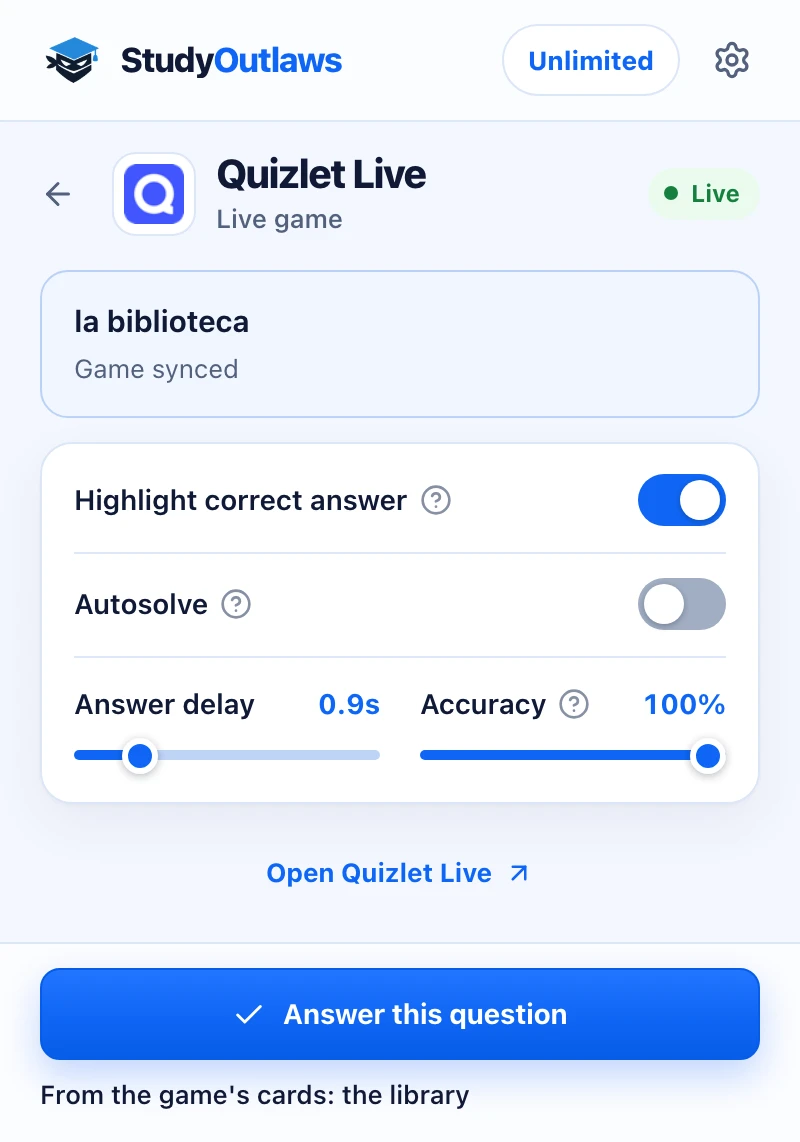
Join the game with the extension on. When the game starts, the panel says Game synced.
Each prompt shows in the panel, and the answer line says where it came from, here the game's own cards.
Highlight correct answer marks your tile. On Pro, Answer this question or Autosolve picks it for you.
What the extension does in a Quizlet Live game
It shows Game synced once it has read the game's cards.
- Highlight correct answer
- Outlines the right tile when it's on your screen.
- Teammate's answer
- Shows the answer when only a teammate has the tile.
- Picture cards
- Picture tiles are matched from the game's own cards.
Quizlet Live Autosolve settings
These settings need Pro or Ultimate.
- Autosolve
- Selects the right tile when it's on your screen.
- Answer delay
- Waits 0 to 5 seconds first; the default is 0.9 seconds.
- Accuracy
- How often Autosolve is right; the default is 100%.
Set up the Quizlet Live Chrome extension
Quizlet Live answers on your screen
Outlines the right tile from the game's own cards, shows a teammate's answer, and Pro autosolve can select your tile.
- Highlight correct answer
- Teammate's answer in the panel
- Pro autosolve with delay and accuracy
Limits of the Quizlet Live tools
It answers from the game you joined, one question at a time.
- It works on the player page at quizlet.com/live, not the host's screen or study modes.
- It only clicks your own tiles; a teammate's answer is shown, never clicked.
- AI only answers text questions, so a picture question the cards miss gets no answer.
- Every answer it delivers costs 0.5 credits, including a teammate's answer.
Comparing several platforms? Read the school hacks guide
What you get on each plan
Same credits either way; Pro and Ultimate also click your tile.
See the answer
- Highlight correct answer on your tiles
- Show answer for the current question
- Your teammate's answer in the panel
Let it answer
- Autosolve selects the right tile
- Answer this question clicks it once
- Answer delay and Accuracy settings
Quizlet Live FAQ
How do I get Quizlet Live answers?
Install the StudyOutlaws Chrome extension, sign in and join the game at quizlet.com/live. When a question appears, the correct tile on your screen gets an outline. If it's on a teammate's screen, the extension shows the answer instead.
Is there a Quizlet Live hack or cheat that works?
StudyOutlaws has no bot that joins or plays for you, and it doesn't change the game. The extension works on your own game screen: it outlines the right tile, tells you when the answer is on a teammate's screen and, on Pro or Ultimate, can select your tile. Follow your school's rules and Quizlet's terms.
Does it work in team mode?
Yes. Each player only sees some of the answers. When the right one is on a teammate's screen, the extension shows On a teammate's screen and the answer, so you can tell them. Nothing is clicked.
Can it answer Quizlet Live automatically?
Yes, with Pro or Ultimate. Turn on Autosolve and it selects the tile after your Answer delay. Accuracy starts at 100%, because in team games one wrong answer sends your whole team back to the start.
Is the Quizlet Live extension free?
Highlighting works on the Free plan. Each answer uses 0.5 task credits, so the 15 weekly Free credits cover up to 30 answers. Reading the game's cards is free.
What if I joined before installing the extension?
Reload the page and join again so the extension can read the cards. If it still can't, it shows Couldn't read this game's cards and answers text questions with AI.
Does it work on other Quizlet modes?
No. It works in Quizlet Live games only, not in Learn, Test, Match or flashcards.
Set up Quizlet Live in Chrome.
Install the extension and sign in before you join the game.
Other platform guides





StudyOutlaws is not affiliated with or endorsed by Quizlet. The extension is in beta, and a change to Quizlet Live can stop answers until we update it.