
 More sites in the Chrome extension
Get Quizlet Live answers with the StudyOutlaws extension
Install the extension, sign in and join your game at quizlet.com/live. The extension reads the game's cards and outlines the right tile on every plan. When the answer is on a teammate's screen, it shows the answer instead. Pro or Ultimate can turn on Autosolve. Each answer costs 0.5 task credits.
- Access
- Any signed-in account; Autosolve needs Pro or Ultimate
- Cost
- 0.5 credits per answer; reading the cards is free
- Buttons
- Answer this question, Show answer
- Where
- Chrome extension on quizlet.com/live
How it works
- Install and sign in
Add the extension to Chrome and sign in before you join.
- Join the game
Enter the join code at quizlet.com/live and wait until the extension shows Game synced.
- Answer
Click the outlined tile, tell a teammate their answer, or let Autosolve answer on Pro or Ultimate.
What you will see
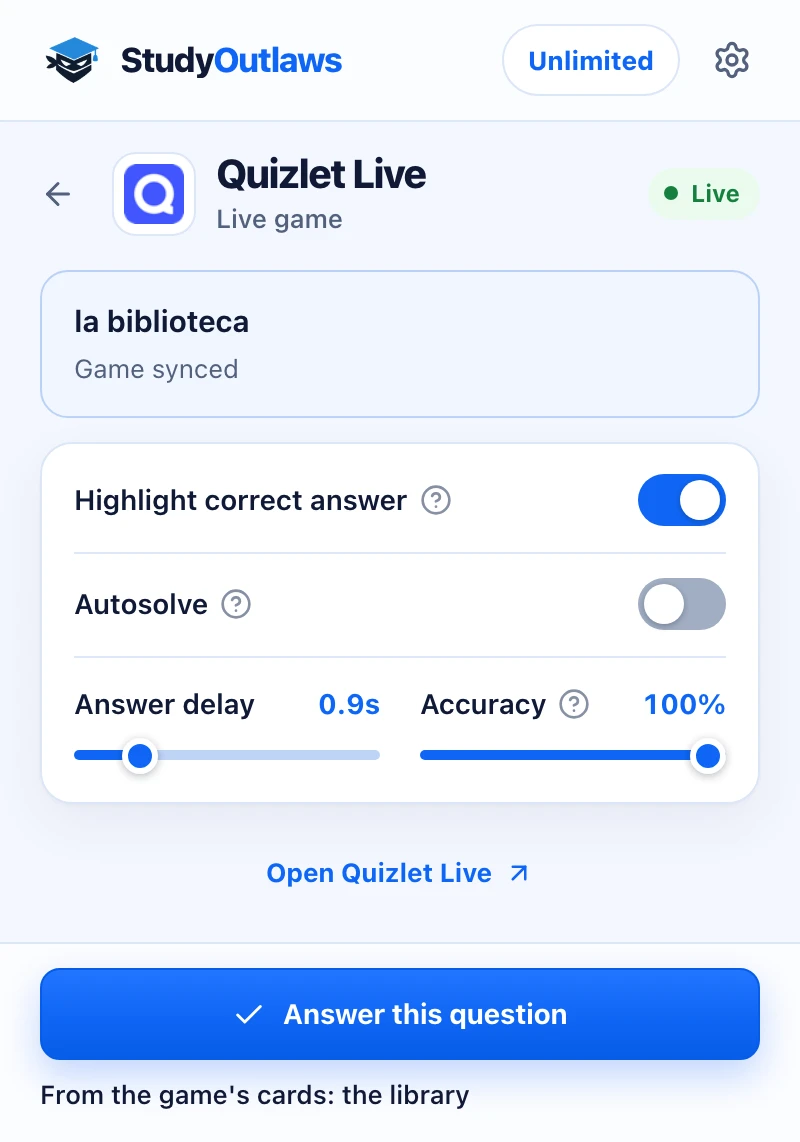
Join the game with the extension on. When the game starts, the panel says Game synced.
Each prompt shows in the panel, and the answer line says where it came from, here the game's own cards.
Highlight correct answer marks your tile. On Pro, Answer this question or Autosolve picks it for you.
How to install the extension and sign in
- Open the listing
Use the Extension page on this site to open the StudyOutlaws listing in the Chrome Web Store, then add it to Chrome.
- Sign in
Open the extension and sign in with your StudyOutlaws account. A Free account is enough for highlighting.
- Reload Quizlet Live
If the game page was open while you installed the extension, reload it and join again.
How to use it in a Quizlet Live game
- Join the game
Enter the join code at quizlet.com/live. Until the game starts, the extension shows Join a game and keep this panel open.
- Wait for Game synced
The extension sends the game's card set to StudyOutlaws once per game. While it does, it shows Syncing the game, and then Game synced.
- Follow the highlight
When a question appears, the right tile on your screen gets an outline. Answers come from the game's cards first; text questions the cards miss go to AI.
- Help your team
If the answer isn't on your screen, the extension shows On a teammate's screen and the answer, so you can tell them. Nothing is clicked.
- Use the button
On Pro or Ultimate, Answer this question selects the right tile. On Free, the same button reads Show answer and only reveals it.
Quizlet Live answer settings
- Highlight correct answer: on by default. It outlines the correct tile in the game.
- Autosolve: off by default, and needs Pro or Ultimate. After your delay it selects the correct tile when it's on your screen, and answers each question once.
- Answer delay: 0 to 5 seconds, in steps of 0.1 seconds. The default is 0.9 seconds.
- Accuracy: 0 to 100%, the chance that Autosolve picks the correct tile. The default is 100%.
If Quizlet Live answers don't show up
- Join a game and keep this panel open: the extension hasn't seen a game yet. Join at quizlet.com/live, not on the host's screen.
- Couldn't read this game's cards. Answers come from AI: reload the page and join again. Until it syncs, text questions still get AI answers, but picture questions don't.
- Reload the Quizlet Live game so the extension can apply these settings: the page was open before the extension was ready. Reload it.
- Wait until a Quizlet Live question is visible: press Answer this question only while a question is on screen.
- No outline, but the extension shows On a teammate's screen: the answer is on someone else's tiles. Tell them the answer.
- This Quizlet Live answer is a picture. Update the extension to see it: update the StudyOutlaws extension in Chrome, then reload the game.
- Not enough task credits remaining: wait for your credits to reset, or upgrade your plan.
What Quizlet Live answers cost
Each answer the extension delivers costs 0.5 task credits, whether it comes from the game's cards or from AI. An answer on a teammate's screen counts too.
Sending the game's card set is free, and a failed answer costs nothing.
The Free plan has 15 task credits a week, which covers up to 30 answers. Pro has 100 a day and Ultimate is unlimited. Autosolve and Answer this question need Pro or Ultimate.
Limits of the Quizlet Live tools
- It works on the player page at quizlet.com/live only. The host's screen and Quizlet study modes such as Learn, Test and Match aren't covered.
- Highlighting and Autosolve only act on your own tiles. A teammate's answer is shown, never clicked.
- AI only answers text questions. A picture question the game's cards don't cover gets no answer.
- Very large card sets are too big to send, so every question in them goes to AI.
- There's no Quizlet Live tool in the dashboard, and the extension needs Chrome on a computer.
Common questions
Is the Quizlet Live extension free?
Highlighting works on the Free plan. Each answer uses 0.5 task credits, and reading the game's cards is free.
Does it work in team mode?
Yes. When the answer is on a teammate's screen, the extension shows it so you can tell them.
Can it answer Quizlet Live for me?
Yes, with Pro or Ultimate. Turn on Autosolve and it selects the right tile after your Answer delay.
Why is Accuracy set to 100%?
In team games, one wrong answer sends your whole team back to the start, so Autosolve aims to get every answer right by default.
Ready to try it?
Questions along the way? Ask support and include this guide's link.
Related guides
- StudyOutlaws Chrome extension setup and supported sites4 min read
- Run now, sessions and scheduling3 min read
 Get Gimkit answers with the StudyOutlaws extension4 min read
 Find Kahoot answers with the Answer Solver4 min read
 Find Blooket answers with the Answer Solver3 min read
- Getting started with StudyOutlaws4 min read