
 More sites in the Chrome extension
Get Gimkit answers with the StudyOutlaws extension
Install the extension and sign in before you join a Gimkit game. When a question opens, the correct choice is outlined on every plan, and Pro or Ultimate can turn on Autosolve. One lookup returns the whole game for 0.5 task credits.
- Access
- Any signed-in account; Autosolve needs Pro or Ultimate
- Cost
- 0.5 credits per game lookup, plus 0.5 per AI answer
- Buttons
- Get answers, Answer this question, Show answer
- Where
- Chrome extension on gimkit.com
How it works
- Install and sign in
Add the extension to Chrome and sign in before the game starts.
- Join the game
Join with your game code. If Gimkit was already open, reload it first.
- Answer
Pick the outlined choice, or let Autosolve answer on Pro or Ultimate.
What you will see
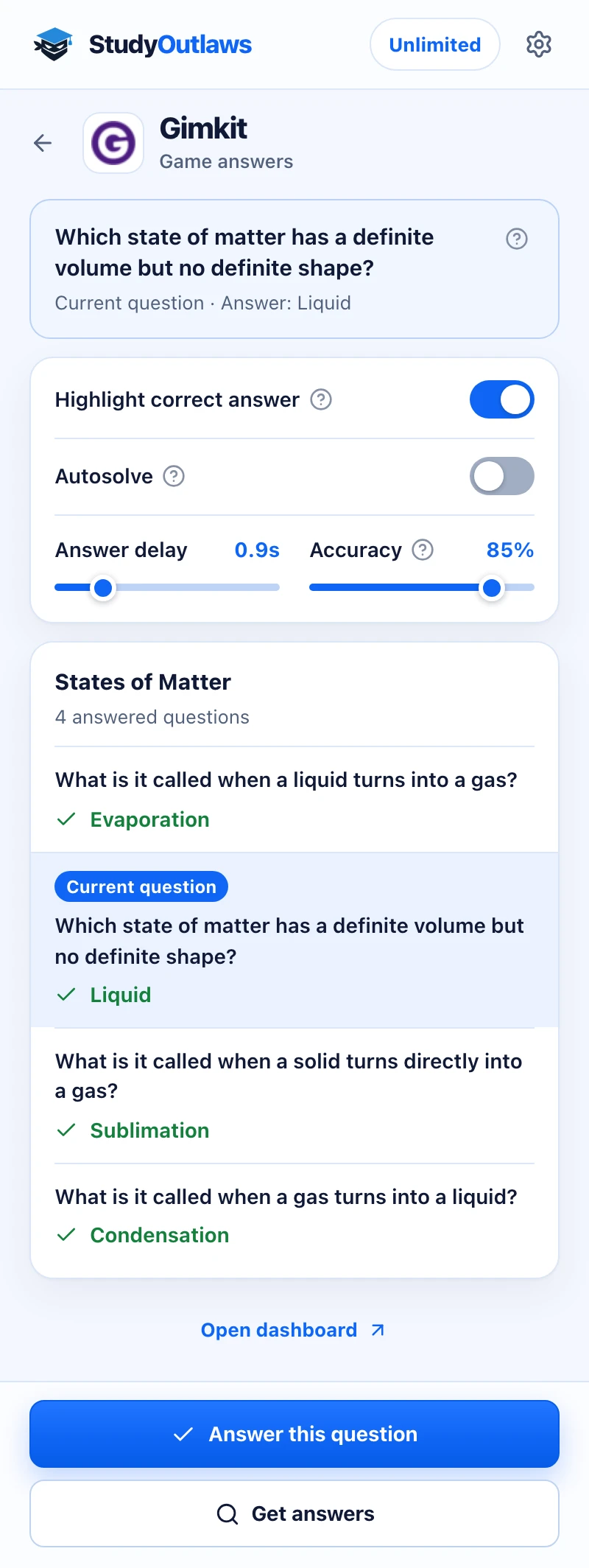
Press Get answers once you're in the game. The whole game's questions and answers load at once.
The current question is marked in the list, and its answer shows at the top. Highlight correct answer marks the right tile in the game.
Answer this question picks the answer for you on Pro, using your Answer delay and Accuracy. On other plans the button shows the answer instead.
How to install the extension and sign in
- Open the listing
Use the Extension page on this site to open the StudyOutlaws listing in the Chrome Web Store, then add it to Chrome.
- Sign in
Open the extension and sign in with your StudyOutlaws account. A Free account is enough for highlighting.
- Reload Gimkit
If a Gimkit tab was open while you installed the extension, reload it. The extension reads the game as it arrives, so it has to be running before you join.
How to use it in a Gimkit game
- Join the game
Enter your game code on Gimkit as usual.
- Wait for a question
With Highlight correct answer on, the extension gets the game's answers when the first question opens. The correct choice gets an outline and a Correct badge.
- Open the extension
On the Gimkit tab, the extension shows the Gimkit tools. The question card reads Current question with its answer once it matches the question on screen.
- Use the buttons
Get answers lists every answer in the game. On Pro or Ultimate, Answer this question selects the answer for the question on screen. On Free, the same button reads Show answer and only reveals it.
Gimkit answer settings
- Highlight correct answer: on by default. It outlines the correct choice in the question window.
- Autosolve: off by default, and needs Pro or Ultimate. After your delay it selects an answer, then presses Continue on the feedback screen. It never presses Close and stops when the question window closes.
- Answer delay: 0 to 5 seconds, in steps of 0.1 seconds. The default is 0.9 seconds.
- Accuracy: 0 to 100%, the chance that Autosolve picks the correct answer. The default is 85%, so it sometimes picks a wrong answer on purpose. Set 100% to always answer correctly.
If Gimkit answers don't show up
- Reload this page to activate the extension: the tab was open before the extension was installed. Reload it and join the game again.
- No supported answers were found: the extension didn't see the game's question data. Reload the Gimkit page, join again and press Get answers.
- This question isn't in the retrieved answers: press Get answers to refresh them. With highlighting on, the extension also looks once more by itself and then asks AI.
- Current question not identified: the answers are listed, but the extension couldn't tell which one is on screen. Find your question in the list.
- No outline on a question: highlighting only covers multiple-choice questions with text choices. For a typed question, read the answer in the list and type it yourself.
- Autosolve shows a Pro lock: Autosolve needs Pro or Ultimate. Highlighting keeps working on your plan.
- Not enough task credits remaining: wait for your credits to reset, or upgrade your plan.
What Gimkit answers cost
A successful lookup costs 0.5 task credits and returns the answers for the whole game. The automatic lookup reuses those answers for the rest of the game, but each press of Get answers is a new lookup and costs 0.5 credits again.
A question the game data doesn't cover goes to AI and costs 0.5 credits. The extension labels it AI answer. Failed or empty lookups cost nothing.
The Free plan has 15 task credits a week, Pro has 100 a day and Ultimate is unlimited. Autosolve and Answer this question need Pro or Ultimate.
Limits of the Gimkit tools
- Highlighting and Autosolve work on multiple-choice questions only. Choices that are only a picture are skipped.
- AI doesn't answer typed questions.
- The answers are a snapshot taken at the lookup. If you start a new game in the same tab, the extension looks again once when a question isn't in the saved answers.
- There's no Gimkit tool in the dashboard, and the extension needs Chrome on a computer.
Common questions
Is the Gimkit extension free?
Highlighting works on the Free plan. Each game lookup uses 0.5 task credits, and each AI answer another 0.5.
Can it answer Gimkit questions for me?
Yes, with Pro or Ultimate. Turn on Autosolve, set your Answer delay and Accuracy, and it answers and presses Continue for you.
Why does Autosolve get some questions wrong?
Accuracy starts at 85%, so it picks a wrong answer on purpose now and then. Set Accuracy to 100% to always answer correctly.
Do I need to reload Gimkit after installing?
Yes, if Gimkit was already open. The extension has to be running before you join the game.
Ready to try it?
Questions along the way? Ask support and include this guide's link.
Related guides
- StudyOutlaws Chrome extension setup and supported sites4 min read
- Run now, sessions and scheduling3 min read
 Get Quizlet Live answers with the StudyOutlaws extension4 min read
 Find Kahoot answers with the Answer Solver4 min read
 Find Blooket answers with the Answer Solver3 min read
- Getting started with StudyOutlaws4 min read