
 Canvas guide
How to get Canvas quiz answers
Open a Canvas New Quizzes quiz with the StudyOutlaws extension open and press Get answers. The extension reads the question and its options, StudyOutlaws works out the answer, and it's marked on the quiz. With Highlight answer on, each question is looked up as it appears.
On Pro or Ultimate, Fill in answers and Autosolve enter the answers for you after your delay and go to the next question. Your own answers stay. An optional auto-submit, off by default, submits the quiz once every question is answered.
It works on Canvas at instructure.com right away, and on your school's own Canvas address after you press Enable on this site. Each answer costs 0.5 credits.
How to use it
- Install the extension
Use the Chrome Web Store link on the StudyOutlaws Extension page.
- Sign in
Use your StudyOutlaws account; a Free account is enough.
- Open the quiz
Open the New Quizzes quiz, and press Enable on this site on your school's own address.
- Answer it
Press Get answers, or Fill in answers on Pro, then check and submit.
What you will see
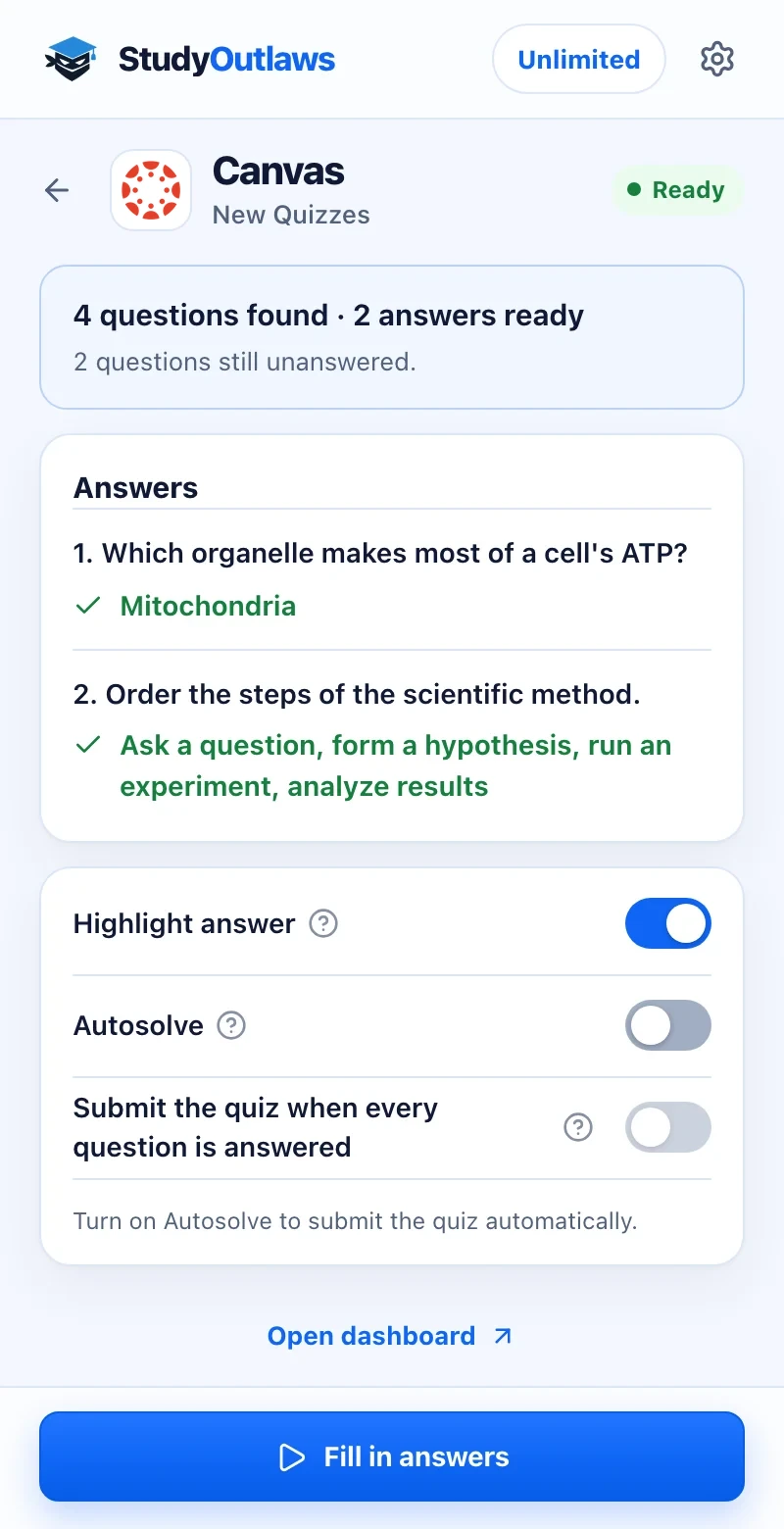
Open the New Quizzes quiz. The panel counts the questions it found and the answers that are ready.
Each answer is listed in the panel and marked on the quiz. Press Get answers, or Fill in answers on Pro.
Autosolve fills in unanswered questions on Pro. Submit the quiz when every question is answered stays off unless you turn it on.
What the extension does on a Canvas quiz
Get answers and Highlight answer work on every plan. Fill in answers, Autosolve and auto-submit need Pro or Ultimate.
- Multiple choice and multiple answer
- Marks the right options on the quiz.
- Matching and ordering
- Shows the right match for each item and the right order.
- Autosolve
- Fills in unanswered questions after your delay on Pro, then goes on.
- Optional auto-submit
- Off by default; submits the quiz once every question is answered.
Set up the Canvas Chrome extension
Canvas quiz answers and autosolve
Marks answers on Canvas New Quizzes, and Pro autosolve can fill them in, with an optional auto-submit that is off by default.
- Get answers and highlighting
- Pro autosolve with delay
- Works on your school's own Canvas address
Limits of the Canvas tools
It answers New Quizzes questions and submits only when you ask.
- It works on Canvas New Quizzes; Classic Quizzes aren't supported yet.
- On a school's own Canvas address, nothing is read until you press Enable on this site.
- It never reads answer keys or result pages, and AI answers can be wrong.
- Auto-submit is off by default and a reload turns it off again.
Comparing several platforms? Read the school hacks guide
What it answers on Canvas
The extension answers the common New Quizzes question types. Classic Quizzes aren't supported yet.
Canvas New Quizzes
- Multiple choice and multiple answer
- Matching and ordering
- Pictures in the question, when the page shows them
Everything else
- Classic Quizzes
- Other New Quizzes question types
- Submitting, unless you turn on auto-submit
Canvas FAQ
How do I get Canvas quiz answers?
Install the StudyOutlaws Chrome extension, sign in and open a New Quizzes quiz in Canvas. Press Get answers, and each answer is marked on the quiz. On your school's own Canvas address, press Enable on this site first.
Is there a Canvas quiz hack or cheat that works?
StudyOutlaws doesn't change your grades. The extension reads the question on screen, works out the answer with AI and marks it on the quiz. On Pro or Ultimate, Autosolve can fill it in. Follow your school's rules.
Can it answer Canvas quizzes automatically?
Yes, on Pro or Ultimate. Turn on Autosolve and it fills in each question you haven't answered after your delay, then goes to the next one. It submits the quiz only if you also turn on auto-submit for that attempt.
Does it work on my school's Canvas site?
Yes. On canvas.instructure.com and yourschool.instructure.com it works right away. On your school's own address, open a quiz, press Enable on this site, allow it in Chrome and reload the quiz.
Does it work on Canvas Classic Quizzes?
Not yet. Classic Quizzes aren't supported, so answer those quizzes yourself. It works on New Quizzes.
Is the Canvas extension free?
Get answers and highlighting work on every plan for 0.5 credits per answer, so Free's 15 weekly credits cover about 30. Autosolve and auto-submit need Pro or Ultimate.
Set up Canvas in Chrome.
Install the extension, sign in and open a Canvas New Quizzes quiz.
Other platform guides
 Membean6 min read
 Kahoot8 min read
 Blooket7 min read
 Wayground / Quizizz6 min read
 DeltaMath6 min read
 Edpuzzle6 min read
 Pear Assessment6 min read
 Google Classroom6 min read
 IXL6 min read
 Edmentum4 min read
 Gimkit4 min read
 Khan Academy4 min read
 Quizlet Live4 min read
 Google Forms4 min read
 NoRedInk4 min read
 AP Classroom4 min read
 Savvas Realize3 min read
 Amplify3 min read
StudyOutlaws is not affiliated with or endorsed by Instructure. Canvas answers come from AI and can be wrong, so check them.