
 Savvas Realize guide
How to get Savvas Realize answers
Open a Savvas Realize assessment with the StudyOutlaws extension open. When Savvas loads a question, the extension sends that question to StudyOutlaws, which reads its correct response and returns the answer. The panel shows Correct answer, or Correct answers when there are several.
The extension only shows the answer. You select it in Savvas and go to the next question yourself, and it never submits the assessment.
Each question costs 0.5 credits the first time, and opening the same question again within four hours is free. A question StudyOutlaws can't answer costs nothing.
How to use it
- Install the extension
Use the Chrome Web Store link on the StudyOutlaws Extension page.
- Sign in
Use your StudyOutlaws account; a Free account is enough.
- Open a question
Open the assessment, then reload it if it was already open.
- Answer it
Read the answer in the panel and select it in Savvas.
What you will see
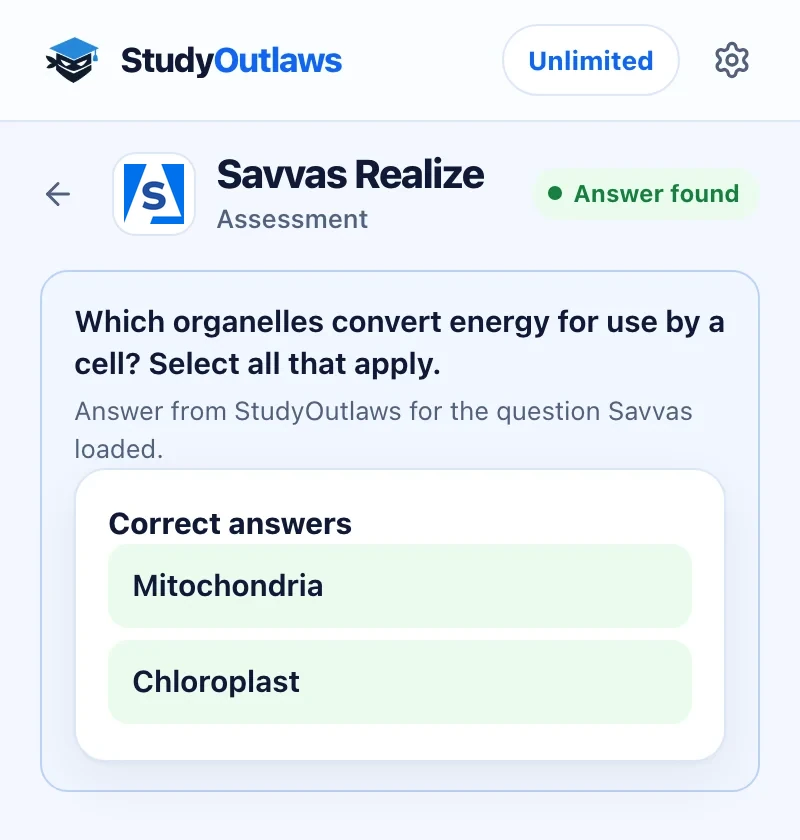
Open the assessment. When Savvas loads a question, the panel shows it.
Correct answers lists every right choice, here two for a select-all question. The status says Answer found.
Select the answers in Savvas yourself. The extension never selects, moves on or submits.
What the extension shows on Savvas Realize
Answers appear on their own as Savvas loads each question; there's no button to press.
- Single choice
- Shows the one correct answer for the question on screen.
- Several correct answers
- Lists every correct answer when a question has several.
- Question by question
- Follows the assessment: a new question gets its answer as Savvas loads it.
- Clear when it can't
- Says Unsupported, with the reason, for a question type it can't read.
Set up the Savvas Realize Chrome extension
Savvas Realize assessment answers
Shows the correct answer for each Savvas Realize assessment question as Savvas loads it, without selecting or submitting.
- Answers appear on their own
- Several correct answers listed
- Never selects or submits
Limits of the Savvas Realize tools
It shows answers and leaves every click to you.
- It works on Savvas Realize assessments at www.savvasrealize.com.
- It never selects an answer, moves on or submits the assessment.
- Only the question Savvas loads is sent, never Savvas account details or cookies.
- There's no Savvas Realize tool in the dashboard, and it needs Chrome on a computer.
Comparing several platforms? Read the school hacks guide
What it answers on Savvas Realize
The extension shows the correct answer for each assessment question. You select it and move on yourself.
Savvas Realize assessments
- Single-choice questions
- Questions with several correct answers
- Every question Savvas loads in an assessment
Your own clicks
- Selecting and submitting
- Moving to the next question
- Question types it can't read yet
Savvas Realize FAQ
How do I get Savvas Realize answers?
Install the StudyOutlaws Chrome extension, sign in and open a Savvas Realize assessment. When Savvas loads a question, the panel shows its correct answer, or every correct answer when there are several.
Is there a Savvas Realize hack or cheat that works?
StudyOutlaws doesn't change your scores or the assessment. The extension shows the correct answer for the question on screen, and you select it yourself. Follow your school's rules.
Does it answer Savvas Realize questions for me?
No. It shows the answer in the panel. Selecting the answer, moving to the next question and submitting stay with you.
Which Savvas Realize questions work?
Single-choice questions and multiple-choice questions with several correct answers. Other types show Unsupported with the reason.
Is the Savvas Realize extension free?
Yes, on every plan. Each question costs 0.5 credits the first time, and the same question again within four hours is free. Free's 15 weekly credits cover about 30 questions.
Set up Savvas Realize in Chrome.
Install the extension, sign in and open a Savvas Realize assessment.
Other platform guides
 Membean6 min read
 Kahoot8 min read
 Blooket7 min read
 Wayground / Quizizz6 min read
 DeltaMath6 min read
 Edpuzzle6 min read
 Pear Assessment6 min read
 Google Classroom6 min read
 IXL6 min read
 Edmentum4 min read
 Gimkit4 min read
 Khan Academy4 min read
 Quizlet Live4 min read
 Google Forms4 min read
 NoRedInk4 min read
 AP Classroom4 min read
 Amplify3 min read
 Canvas4 min read
StudyOutlaws is not affiliated with or endorsed by Savvas Learning Company. Which questions it can answer varies by assessment.