

Use the Wayground Answer Solver
Look up Wayground answers using a live code or public quiz URL. Set the request filter before lookup and review the returned question cards afterward; waiting and partial results are distinct states.
- Access
- Free or above
- Cost
- 10 task credits per lookup
- Input
- 6–8-character code or supported public quiz URL
- Account
- No saved platform login required for lookup
How it works
- 1Enter source
Use an active code or a public admin/quiz URL.
- 2Optionally filter
Question filter narrows fetched questions after source resolution. Enter it before Get Answers.
- 3Review results
Review the returned question cards and inspect source notices and missing answers.
Controls and result walkthrough
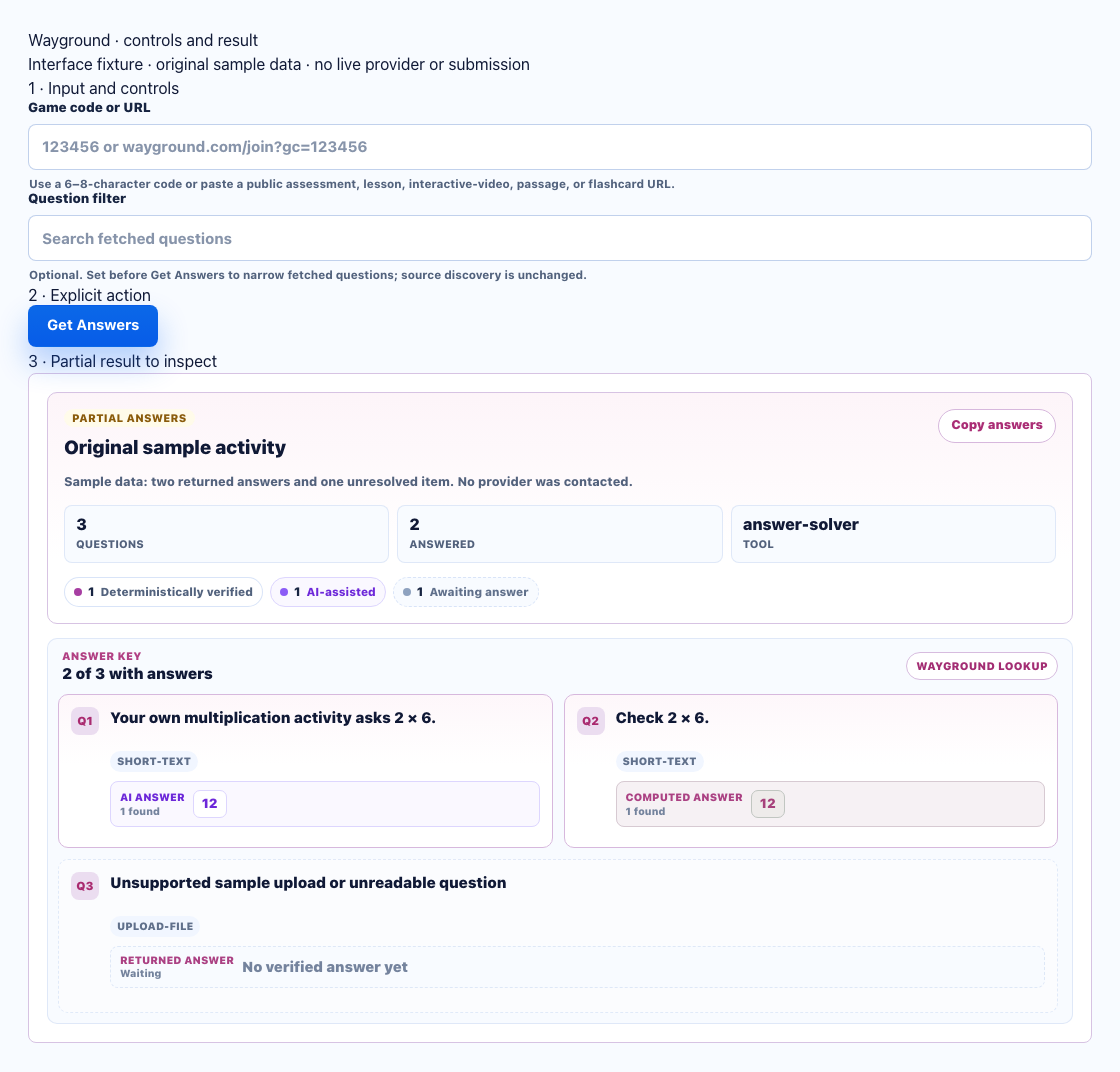
- Use an active code or supported public activity URL.
- Set Question filter before Get Answers. Review the returned cards; there is no separate result-search control.
- Review the resolved source and unresolved cards. Ended or unreadable rooms can return no usable data.
Accepted URL example
A public URL such as https://wayground.com/admin/quiz/0123456789abcdef01234567 identifies a quiz by its 24-character ID. This is a format example, not a working public quiz. Supported legacy quizizz.com/admin/quiz/ URLs use the same source family. A school login page or arbitrary room URL is not a quiz source.
Question filter before lookup
Question filter is a setup field. Fill it before Get Answers if you want a narrower returned question list; source discovery ignores it. Once a result appears, review the returned question cards. Wayground has no separate result-search control. If a valid quiz returns no questions, clear the request filter and run again.
Successful-result example
For your own public two-question activity, a successful fixture result shows the resolved quiz title, two question cards and their answer/source labels. Check that both match your activity. A partial result can still have unanswered items; two visible cards are not an accuracy guarantee.
Unsupported-room example and recovery
A code for an ended room can return waiting, missing source or no questions rather than a usable answer key. Recheck the live code; use the public quiz URL if available. If the activity is private or exposes no supported question data, complete it manually instead of repeatedly retrying the same room.

