
 More sites in the Chrome extension
Get Savvas Realize answers with the extension
Open a Savvas Realize assessment with the StudyOutlaws extension. When Savvas loads a question, the panel shows its correct answer, or every correct answer when the question has several. You select the answer and move on yourself. Each question costs 0.5 credits once.
- Access
- Any signed-in account, including Free
- Cost
- 0.5 credits per question
- Buttons
- None: answers appear on their own
- Where
- Chrome extension on a Savvas Realize assessment
How it works
- Open the assessment
Start or resume a Savvas Realize assessment and let the question load.
- Read the answer
Open the extension. The panel shows the correct answer for the question on screen.
- Answer it
Select the answer in Savvas yourself, then go to the next question.
What you will see
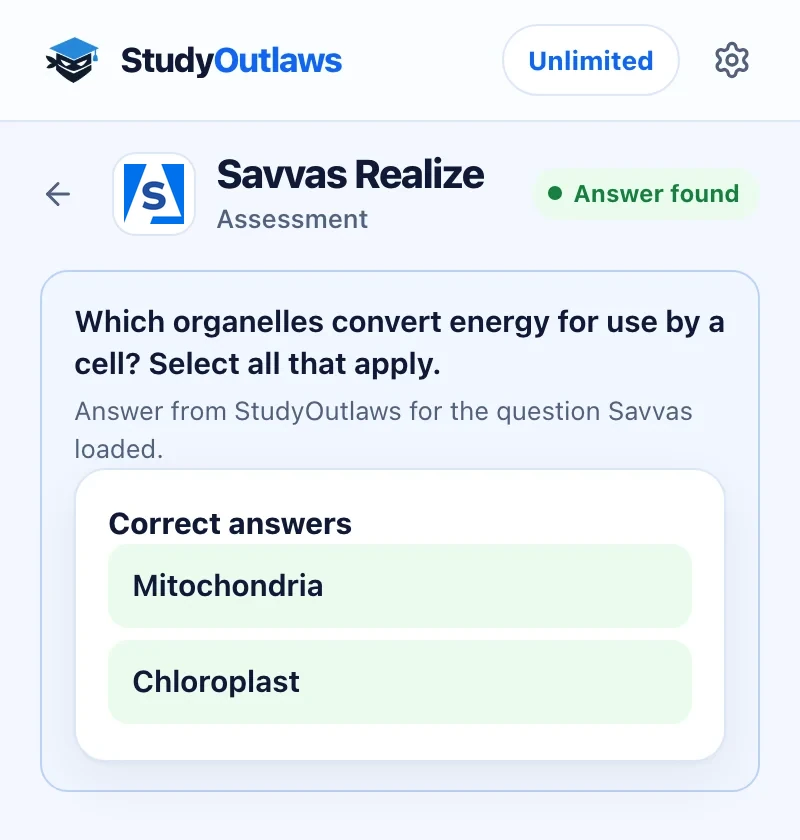
Open the assessment. When Savvas loads a question, the panel shows it.
Correct answers lists every right choice, here two for a select-all question. The status says Answer found.
Select the answers in Savvas yourself. The extension never selects, moves on or submits.
Install the extension and sign in
- Install it
Open the Extension page on this site and add StudyOutlaws to Chrome from the Chrome Web Store.
- Pin it
Pin the extension to the toolbar so it's one click away.
- Sign in
Sign in with your StudyOutlaws account. A Free account is enough to see answers.
- Reload the page
If the assessment was already open, reload it so the extension can see the next question Savvas loads.
How to see answers on a Savvas Realize assessment
- Open a question
Open an assessment on www.savvasrealize.com. Each time Savvas loads a question, the extension sends that question to StudyOutlaws.
- Read the answer
The panel shows Correct answer, or Correct answers when the question has several, with the answer text. The status says Answer found.
- Enter it yourself
Select the answer in Savvas and continue. The extension doesn't select, submit or move to the next question.
Which questions it answers
- Single-choice questions: the panel shows the one correct answer.
- Multiple-choice questions with several correct answers: the panel lists all of them.
- Other question types show Unsupported with the reason, for example This question type is not yet supported. Answer those yourself.
If it doesn't work
- The panel says Open an assessment question: open a question in an assessment. Answers appear when Savvas loads the question.
- The panel keeps saying Asking StudyOutlaws for the answer: reload the assessment and open the question again.
- It asks you to sign in: sign in with your StudyOutlaws account. The question is asked again once you're signed in.
- It says you're out of credits: wait for your credits to reset, or upgrade your plan.
How much Savvas Realize answers cost
Answers work on every plan. Each question costs 0.5 credits the first time, and the same question again within four hours is free. A question StudyOutlaws can't answer costs nothing. Free includes 15 credits a week, about 30 questions. Pro includes 100 credits a day, and Ultimate is unlimited.
Limits of the Savvas Realize tools
The extension only shows answers. It never selects an answer, submits the assessment or moves to the next question. It reads only the question Savvas loads for the assessment, and no Savvas account details or cookies are sent to StudyOutlaws.
Common questions
Does it answer Savvas Realize for me?
No. It shows the correct answer in the panel, and you select it and move on yourself.
Where do the Savvas Realize answers come from?
From the question Savvas loads for the assessment. StudyOutlaws reads the correct response that comes with it and returns the answer text.
Is it free on Savvas Realize?
Answers work on every plan for 0.5 credits per question. The same question again within four hours is free.
Which question types work?
Single-choice questions and multiple-choice questions with several correct answers. Other types show Unsupported.
Ready to try it?
Questions along the way? Ask support and include this guide's link.
Related guides
- StudyOutlaws Chrome extension setup and supported sites4 min read
- Getting started with StudyOutlaws4 min read
 Get Amplify lesson answers with the extension3 min read
 Get Canvas quiz answers with the extension4 min read
 Get Google Forms quiz answers with the extension4 min read
 Get AP Classroom answers with the extension4 min read