
 More sites in the Chrome extension
Get AP Classroom answers with the extension
Open an AP Classroom assignment with the StudyOutlaws extension signed in. Each multiple-choice answer gets an outline, taken from the assignment's answer key first and AI second. On Pro or Ultimate, Autosolve selects answers and can press Next. Submitting stays yours.
- Access
- Any signed-in account, including Free
- Cost
- 0.5 credits per answer
- Buttons
- Show answer, or Answer this question on Pro
- Where
- Chrome extension on AP Classroom assignments
How it works
- Open the assignment
Sign in to the extension first, then open or reload the assignment.
- Read the answers
Each multiple-choice question on screen gets an outline on the right option.
- Submit yourself
Answer free response, check your work and press Submit in AP Classroom.
What you will see
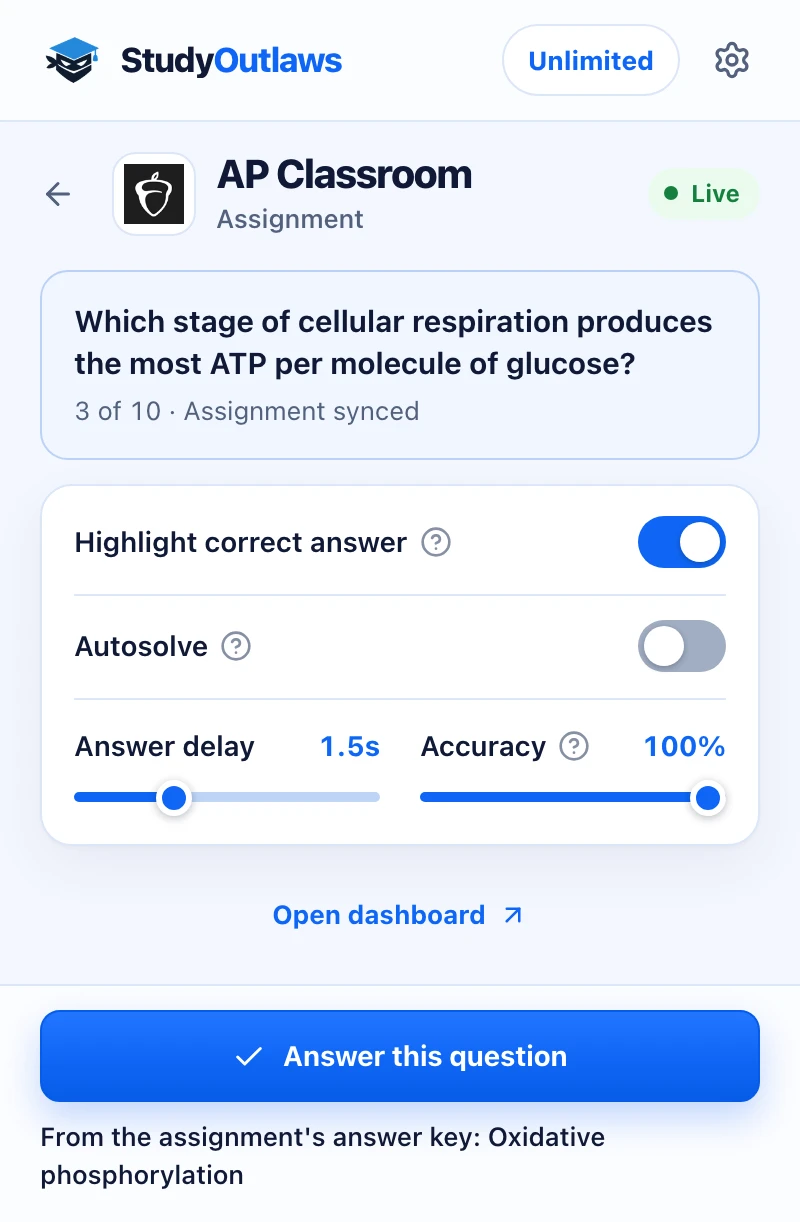
Open the assignment in AP Classroom. The panel shows the question and how far through the assignment you are.
The answer line says where the answer came from, here the assignment's own answer key.
Highlight correct answer outlines it on the page. On Pro, Answer this question or Autosolve picks it, and the extension never presses Finish or Submit.
Install the extension and sign in
- Install it
Open the Extension page on this site and add StudyOutlaws to Chrome from the Chrome Web Store.
- Pin it
Pin the extension to the toolbar so it's one click away in AP Classroom.
- Sign in
Sign in with your StudyOutlaws account. A Free account is enough to see answers.
- Reload the assignment
If the assignment was already open, reload it. The answer key is read only while the assignment loads.
How to get answers on AP Classroom
- Open an assignment
When it loads, the extension passes the assignment to StudyOutlaws, which reads its answer key. The panel shows Assignment synced.
- Open the extension
The AP Classroom panel shows the question on screen and where you are, such as 3 of 10.
- See the answer
With Highlight correct answer on, the right option gets an outline. Or press Show answer. The panel says whether the answer came from the assignment's answer key or the AI fallback.
- Answer and submit
Pick the option yourself, or on Pro press Answer this question. Finish and submit the assignment yourself.
Which AP Classroom questions it answers
- Multiple-choice questions with one correct option or several.
- Options AP Classroom shuffles are still matched to the right answer.
- Questions with pictures are answered only from the answer key, because AI reads text only.
- Free response and other question types stay yours. Autosolve skips them.
Answer settings in the panel
- Highlight correct answer: on at first. It outlines the correct choice in the assignment. Each question on screen is looked up once, and each lookup costs credits.
- Autosolve (Pro or Ultimate): selects the correct choice after your delay. Options you picked yourself stay.
- Go to the next question: shown when Autosolve is on, and on at first. It presses Next once every question on screen is answered. It never presses Finish or Submit.
- Answer delay: how long Autosolve waits before it selects, from 0 to 5 seconds. It starts at 1.5 seconds.
- Accuracy: the chance Autosolve picks the correct choice. At 100% it always does; below 100% it sometimes picks a wrong one on purpose.
- On the Free plan, Autosolve shows a Pro lock. Show answer and Highlight correct answer still work.
If it doesn't work
- The panel says Reload the assignment to sync its answer key: reload the assignment tab. Until then, answers come from AI.
- The panel says Couldn't read this assignment's answer key: answers come from AI for this assignment. Check them carefully.
- The panel says Open an assignment and keep this panel open: open an assignment, not the course page.
- A question gets no answer: it may use pictures with no answer key available. Answer it yourself.
- Autosolve doesn't press Next: a free-response question or an unanswered question is on screen. Answer it, then press Next.
- It says you're out of credits: wait for your credits to reset, or upgrade your plan.
How much the AP Classroom tools cost
Show answer and Highlight correct answer work on every plan. Each answer costs 0.5 credits, including answers from the answer key; syncing the assignment is free. Free includes 15 credits a week, about 30 answers. Pro includes 100 credits a day, and Ultimate is unlimited. Autosolve needs Pro or Ultimate.
Limits of the AP Classroom tools
Only multiple-choice questions are answered. The extension never presses Finish or Submit and never changes an option you picked. AI answers, used when the answer key isn't available, can be wrong and can't see pictures.
Common questions
Where do the AP Classroom answers come from?
From the answer key that comes with the assignment. If it can't be read, AI answers from the question text.
Does it submit my AP Classroom assignment?
No. It never presses Finish or Submit. Go to the next question only presses Next.
What does the Accuracy setting do?
It sets how often Autosolve picks the correct choice. Below 100%, it sometimes picks a wrong one on purpose.
Does it answer free response?
No. Free response stays yours, and Autosolve skips it.
Is it free on AP Classroom?
Yes. Show answer works on every plan for 0.5 credits per answer. Autosolve needs Pro or Ultimate.
Ready to try it?
Questions along the way? Ask support and include this guide's link.
Related guides
- StudyOutlaws Chrome extension setup and supported sites4 min read
- Getting started with StudyOutlaws4 min read
- Run now, sessions and scheduling3 min read
 Get Google Forms quiz answers with the extension4 min read
 Get NoRedInk answers with the extension4 min read
 Get Khan Academy exercise answers with the StudyOutlaws extension4 min read