

Use the DeltaMath Assignment Runner
Preview the selected DeltaMath question and inspect submission eligibility. Verified supported formats may submit; AI-assisted previews, unsupported topics and skipped answers do not establish completion.
- Access
- Ultimate
- Task credits
- No task credits for this dashboard action
- Account
- Linked DeltaMath student login
- Submission
- Supported and verified answer contract required
How it works
- 1Select topic
Connect, load work and choose the intended assessment and topic.
- 2Preview eligibility
Review the question, source label, answer format and whether the result is eligible to submit.
- 3Inspect run counts
After an explicit run, inspect submitted, preview-only and skipped items, then check DeltaMath.
Controls and result walkthrough
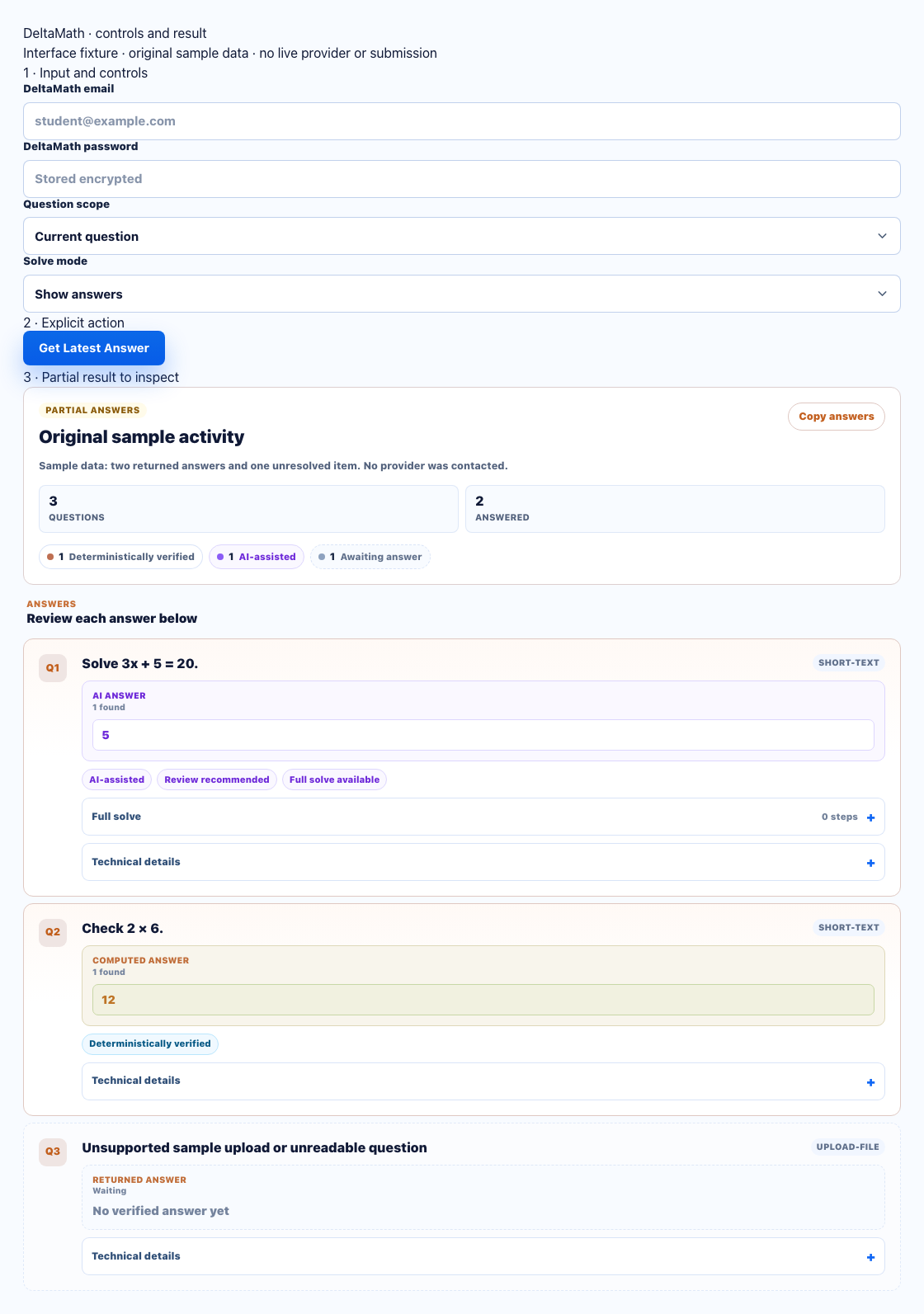
- Choose the exact topic and Show answers before a preview.
- Inspect the answer source and eligibility; AI-assisted previews may not submit.
- Keep unsupported or skipped items visible. A preview count is not assignment completion.
Supported formats and eligibility
Deterministic handlers and provider evidence cover specific numeric, integer, fraction, algebraic-expression, equation and structured graph/geometry responses. Eligibility depends on the exact topic, answer schema and verification evidence, not just a familiar question title. An answer displayed by AI fallback can be useful for review while remaining ineligible for automatic submission.
Preview, submit and skip
- Preview/show mode returns the current answer and source without submitting it.
- Submit mode sends only an answer that meets the implemented topic/format verification rules.
- An AI-assisted or unverified answer can remain preview-only. Check the result label; do not infer eligibility from a plausible answer.
- Unsupported topic/format or failed verification is skipped with a reason. A partial topic run does not mark every question complete.
Skipped-topic example
If a geometry question exposes an unsupported diagram/answer contract, the run can report it as skipped while retaining the topic and reason. A numeric answer to another question does not solve that diagram. Complete the skipped question in DeltaMath and compare the submitted count with the original work.
Recorded result limitation
The existing live screenshot shows one AI-assisted preview out of four items. It does not show submission or full assignment completion. Use the screenshot to inspect source and progress labels, not as proof that all topics can submit.
Errors and recovery
Reconnect an expired session and reload work if the topic changed. For unsupported or skipped questions, use DeltaMath manually and retain the reported reason. After a write error, inspect the current platform progress before starting another run.
